Skip to content
NN Laptops logo
Head-to-head · Workstation

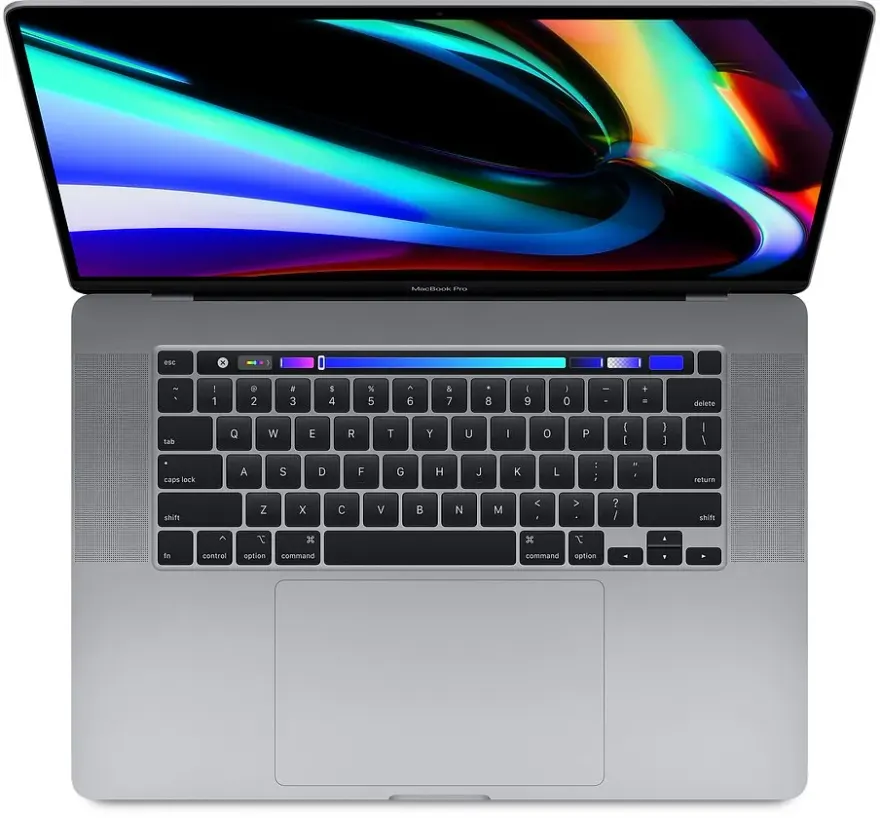
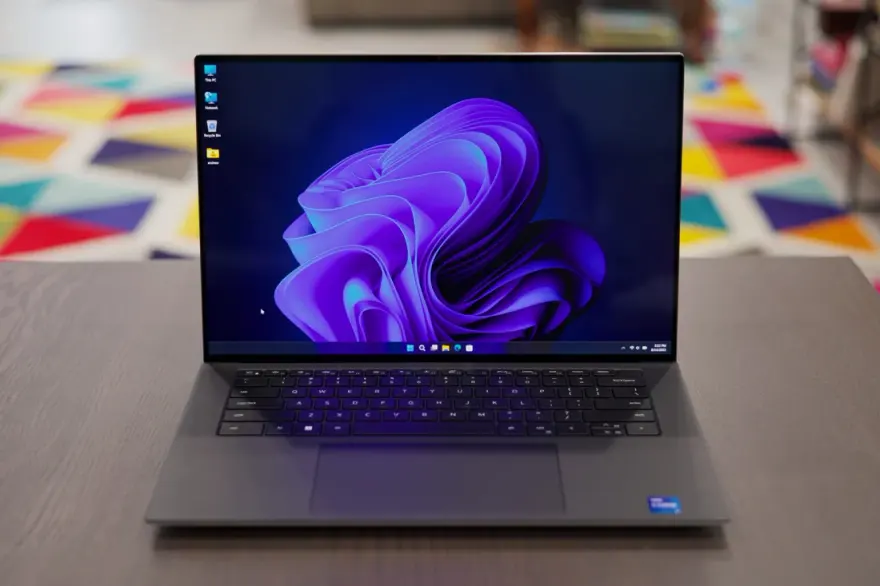
Dell XPS 15 vs MacBook Pro 16

As of 26 November 2026, NN Laptops in Lahore lists the Dell XPS 15 9520 i7-12700H 32GB 1TB Gaming Used Laptop Lahore at Rs. 213,000 (out of stock) and the Apple MacBook Pro 16-inch M2 Pro 2023 M2 Pro 16GB 512GB at Rs. 703,000 (in stock). The Dell XPS 15 9520 i7-12700H 32GB 1TB Gaming Used Laptop Lahore is Rs. 490,000 cheaper.

This is the genuine flagship-vs-flagship Windows-vs-Mac decision Pakistani creative professionals make. For pure gaming and CUDA-dependent workflows (training small ML models locally, Octane render, certain Adobe plugins) the XPS 15 wins decisively. For everything else the MacBook Pro 16 wins on battery, build quality, display response time (120 Hz vs 60 Hz), and macOS efficiency.

Prices checked .

Windows creative flagship with discrete RTX vs Apple Silicon Mac — the two laptops Pakistani creators actually shortlist before they buy.

At a glance

Dell XPS 15 9520 i7-12700H 32GB 1TB Gaming Used Laptop Lahore is currently out of stock at Rs. 213,000. Apple MacBook Pro 16-inch M2 Pro 2023 M2 Pro 16GB 512GB is in stock now at Rs. 703,000. At NN Laptops today, Dell XPS 15 9520 i7-12700H 32GB 1TB Gaming Used Laptop Lahore is listed Rs. 490,000 cheaper. The first takes gaming, value, portability. The second takes programming, battery.

Prices and stock come from our live catalogue and can change. Stock is limited to the units listed, and every laptop carries a 30-day warranty. Pay at the shop, by bank transfer, JazzCash or Easypaisa.

Best for

Which laptop wins by use case?

Programming
Apple MacBook Pro 16-inch M2 Pro 2023 M2 Pro 16GB 512GB
Gaming
Dell XPS 15 9520 i7-12700H 32GB 1TB Gaming Used Laptop Lahore
Battery life
Apple MacBook Pro 16-inch M2 Pro 2023 M2 Pro 16GB 512GB
Value
Dell XPS 15 9520 i7-12700H 32GB 1TB Gaming Used Laptop Lahore
Portability
Dell XPS 15 9520 i7-12700H 32GB 1TB Gaming Used Laptop Lahore
Pakistan context

How this rivalry plays out in Pakistan.

Both laptops arrive in Pakistan through similar channels (authorised resellers, grey-market Dubai/Singapore imports, and our used-market segment), but the buyer journeys diverge. Dell XPS 15 buyers tend to be Windows-loyal creative pros who need CUDA-accelerated workflows, Pakistani gamers who want a 'serious' creative laptop that also plays AAA games, and engineering professionals (mechanical, architectural) who need both creative tools and Windows-only CAD software. MacBook Pro 16 buyers tend to be design-school graduates working in Apple-ecosystem creative tools (Final Cut Pro, Logic Pro, Motion), iOS/macOS developers, and Pakistani professionals returning from work stints in the US/UK/Gulf where they got accustomed to macOS.

By use case

Which wins for which workflow?

Use caseWinnerReasoning
Adobe Premiere Pro / After Effects (Windows-anchored creator)Dell XPS 15 9520 i7-12700H 32GB 1TB Gaming Used Laptop LahoreXPS 15's RTX 3050 + i7-12700H + 32GB DDR5 + Windows-native Adobe plugin ecosystem deliver predictable performance. Cheaper, faster GPU rendering for After Effects RAM previews, and unlimited Windows-only plugin compatibility.
Final Cut Pro / DaVinci Resolve / Motion (Apple-anchored creator)Apple MacBook Pro 16-inch M2 Pro 2023 M2 Pro 16GB 512GBMacBook Pro 16's M2 Pro silicon + ProRes hardware acceleration + Metal-optimised codepaths deliver 30-50% faster exports than the XPS 15's RTX 3050 in these apps. Apple Silicon is the right choice for Apple-ecosystem editing.
CUDA-accelerated ML / data science (PyTorch local training)Dell XPS 15 9520 i7-12700H 32GB 1TB Gaming Used Laptop LahoreXPS 15's RTX 3050 with full CUDA support handles PyTorch / TensorFlow / Stable Diffusion local training. MacBook Pro 16's Metal Performance Shaders work but most ML frameworks have weaker MPS support than CUDA. For serious ML work, XPS 15 is the right pick.
iOS / macOS developer (Xcode, Swift)Apple MacBook Pro 16-inch M2 Pro 2023 M2 Pro 16GB 512GBiOS development requires macOS for Xcode and the App Store submission pipeline. MacBook Pro 16 is the only sensible answer. XPS 15 can run macOS via VM (Hackintosh) but it's illegal under Apple's EULA and unreliable in practice.
Cross-platform developer (web, backend, DevOps)Apple MacBook Pro 16-inch M2 Pro 2023 M2 Pro 16GB 512GBMacBook Pro 16's Unix-based macOS, all-day battery, and silent fanless behaviour for most workloads make it the developer's tool. XPS 15 works but the fans spin under heavy loads (Docker, builds) and battery life is much shorter.
Gaming + creative work (hybrid use)Dell XPS 15 9520 i7-12700H 32GB 1TB Gaming Used Laptop LahoreXPS 15's RTX 3050 handles AAA gaming at medium 1080p (40-50 fps) and competitive esports at high 1080p (90+ fps). MacBook Pro 16's gaming is limited to macOS-native ports and Crossover/Game Porting Toolkit experiments — not a serious gaming machine.
All-day unplugged work (travel-heavy consultant)Apple MacBook Pro 16-inch M2 Pro 2023 M2 Pro 16GB 512GBMacBook Pro 16's 16-20 hour real battery beats XPS 15's 6-9 hours by 2-3x. For frequent travelers, the MacBook is the only sensible choice. XPS 15 chains you to power outlets.
Architecture / CAD / engineering (AutoCAD, SolidWorks, Revit)Dell XPS 15 9520 i7-12700H 32GB 1TB Gaming Used Laptop LahoreMost engineering CAD software is Windows-only. SolidWorks doesn't run on macOS, AutoCAD is partially supported, Revit is Windows-only. XPS 15 is the only sensible pick for engineering and architecture workflows.
Who should pick which

Pick the right one for how you work

Choose the Dell XPS 15 9520 i7-12700H 32GB 1TB Gaming Used Laptop Lahore if

Video editors needing CUDA acceleration, gamers who occasionally work, Windows-locked creative pros

  • Adobe Premiere Pro / After Effects (Windows-anchored creator): XPS 15's RTX 3050 + i7-12700H + 32GB DDR5 + Windows-native Adobe plugin ecosystem deliver predictable performance. Cheaper, faster GPU rendering for After Effects RAM previews, and unlimited Windows-only plugin compatibility.
  • CUDA-accelerated ML / data science (PyTorch local training): XPS 15's RTX 3050 with full CUDA support handles PyTorch / TensorFlow / Stable Diffusion local training. MacBook Pro 16's Metal Performance Shaders work but most ML frameworks have weaker MPS support than CUDA. For serious ML work, XPS 15 is the right pick.
  • Gaming + creative work (hybrid use): XPS 15's RTX 3050 handles AAA gaming at medium 1080p (40-50 fps) and competitive esports at high 1080p (90+ fps). MacBook Pro 16's gaming is limited to macOS-native ports and Crossover/Game Porting Toolkit experiments — not a serious gaming machine.
  • Architecture / CAD / engineering (AutoCAD, SolidWorks, Revit): Most engineering CAD software is Windows-only. SolidWorks doesn't run on macOS, AutoCAD is partially supported, Revit is Windows-only. XPS 15 is the only sensible pick for engineering and architecture workflows.

Choose the Apple MacBook Pro 16-inch M2 Pro 2023 M2 Pro 16GB 512GB if

Mac-first creative professionals, FCP / Logic users, anyone wanting all-day battery on a Pro machine

  • Final Cut Pro / DaVinci Resolve / Motion (Apple-anchored creator): MacBook Pro 16's M2 Pro silicon + ProRes hardware acceleration + Metal-optimised codepaths deliver 30-50% faster exports than the XPS 15's RTX 3050 in these apps. Apple Silicon is the right choice for Apple-ecosystem editing.
  • iOS / macOS developer (Xcode, Swift): iOS development requires macOS for Xcode and the App Store submission pipeline. MacBook Pro 16 is the only sensible answer. XPS 15 can run macOS via VM (Hackintosh) but it's illegal under Apple's EULA and unreliable in practice.
  • Cross-platform developer (web, backend, DevOps): MacBook Pro 16's Unix-based macOS, all-day battery, and silent fanless behaviour for most workloads make it the developer's tool. XPS 15 works but the fans spin under heavy loads (Docker, builds) and battery life is much shorter.
  • All-day unplugged work (travel-heavy consultant): MacBook Pro 16's 16-20 hour real battery beats XPS 15's 6-9 hours by 2-3x. For frequent travelers, the MacBook is the only sensible choice. XPS 15 chains you to power outlets.
Before you buy

What to check on either of these used.

  • XPS 15 specifically — inspect the 3.5K OLED panel for burn-in using static test patterns (taskbar shadows, Windows logo retention). OLED burn-in is common on 2+ year old XPS 15 units.
  • XPS 15 — check the carbon-fibre palmrest for cracking near the trackpad corners. A known stress point on XPS 15 chassis after 2-3 years of intensive use. Replacement palmrest assembly is Rs. 18,000-25,000.
  • XPS 15 — run a 30-minute FurMark stress test to verify RTX 3050 thermals. GPU should peak under 85°C. Higher indicates thermal paste degradation (Rs. 4,000-6,000 service) or fan failure (Rs. 6,000-8,000 replacement).
  • XPS 15 — verify all four corners of the Gorilla Glass display cover are free of cracks. Hairline cracks at corners are common and lead to display delamination over time.
  • XPS 15 — check the 86 Wh battery wear via HWiNFO64. Above 25% wear means battery replacement (Rs. 18,000-24,000) is approaching.
  • XPS 15 — verify the SDXC card reader works with a real SD card (not just visual inspection). The card reader is a known failure point.
  • MacBook Pro 16 — verify the unit isn't iCloud-locked. Press Option-Command-R during boot to check Apple ID status. Locked units are unrecoverable.
  • MacBook Pro 16 — check serial number on Apple's Coverage page (checkcoverage.apple.com) for purchase date, original BTO specs, and AppleCare+ status.
  • MacBook Pro 16 — inspect the Liquid Retina XDR mini-LED for dim zones using a full-white background.
  • MacBook Pro 16 — check battery cycle count under About This Mac → System Report → Power.
  • MacBook Pro 16 — check for keyboard top case bulging from battery swelling (a known 16-inch issue). Inspect trackpad surface for unevenness and listen for crackling sounds when pressing keys.
  • Both — confirm Windows 11 Pro / macOS Sequoia or later is properly activated. Insist on activation verification before paying.
Our take

Our take from the Hafeez Center counter

Our honest take: in 2026, the right answer between these two laptops depends almost entirely on three factors — your editing software (Final Cut/DaVinci tilts to MacBook; Premiere/After Effects + Windows plugins tilts to XPS), whether CUDA acceleration matters to your workflow (ML, certain renderers — XPS wins), and whether you need Windows-only software (engineering CAD, broadcast tools — XPS wins). The XPS 15 9520 with the 3.5K OLED touch panel is genuinely one of the best Windows laptops we've ever sold; the OLED panel for HDR work is arguably better than the MacBook's mini-LED for certain colour-grading scenarios. Both carry our 30-day check warranty covering any genuine fault. Both come with documented battery health, thermal stress test results, and OS activation verification. For personalised advice based on your specific software stack and budget, WhatsApp 0314 4000131 — we'll ask 5-6 questions about your primary applications, your client deliverable requirements, and your travel patterns, then recommend the rational choice. We sell both at similar margins so we have no incentive to push the wrong one.

Full spec comparison

Specs side-by-side

SpecOption ADell XPS 15 9520 i7-12700H 32GB 1TB Gaming Used Laptop LahoreOption BApple MacBook Pro 16-inch M2 Pro 2023 M2 Pro 16GB 512GB
CPU
Intel Core i7-12700H (Alder Lake-H, 10 nm Intel 7)Apple M2 Pro (5 nm, 2nd-gen Apple Silicon)
Cores / Threads
14 cores (6P + 8E) / 20 threads, up to 4.7 GHz12-core CPU (8P + 4E), 19-core GPU, 16-core Neural Engine
RAM (default)
32GB DDR5-480016GB unified memory
RAM (max)
64GB (2× SO-DIMM)32GB unified (soldered, BTO only)
Storage
1TB NVMe SSD (PCIe 4.0)512GB NVMe SSD
GPU
NVIDIA RTX 3050 4GB GDDR6 (40 W TGP)Apple 19-core integrated GPU (~6.8 TFLOPS, Metal-optimised)
Display size
15.6-inch16.2-inch
Display resolution
3456×2160 OLED 3.5K Touch InfinityEdge3456×2234 Liquid Retina XDR mini-LED
Refresh rate
60 Hz120 Hz ProMotion adaptive
Battery (Wh)
86 Wh100 Wh
Battery (claimed)
6 to 9 hours mixed productivity16 to 20 hours mixed productivity
Weight
1.96 kg2.15 kg
Ports
2× Thunderbolt 4, 1× USB-C 3.2, SDXC, 3.5 mm (USB-A via included dongle)3× Thunderbolt 4, HDMI 2.1, SDXC, MagSafe 3, 3.5 mm
Keyboard
Backlit, 1.3 mm travel, fingerprint reader integrated in power buttonFull-height Magic Keyboard with Touch ID, 1.0 mm travel, backlit
Build
CNC-machined aluminium lid, carbon-fibre palmrest, Gorilla GlassRecycled aluminium unibody, six-speaker system
Price (NN Laptops Lahore)
Rs. 213,000Rs. 703,000
Best for
Video editors needing CUDA acceleration, gamers who occasionally work, Windows-locked creative prosMac-first creative professionals, FCP / Logic users, anyone wanting all-day battery on a Pro machine
Our verdict

Which one should you buy?

This is the genuine flagship-vs-flagship Windows-vs-Mac decision Pakistani creative professionals make. For pure gaming and CUDA-dependent workflows (training small ML models locally, Octane render, certain Adobe plugins) the XPS 15 wins decisively. For everything else the MacBook Pro 16 wins on battery, build quality, display response time (120 Hz vs 60 Hz), and macOS efficiency. Pick the MacBook Pro 16 if you can pay the premium and value silent fanless behaviour, all-day battery, and the Apple ecosystem.

FAQ

Dell XPS 15 vs MacBook Pro 16 — frequently asked

Dell XPS 15 or MacBook Pro 16 for video editing in Pakistan?

+

Depends on your editing software. For Final Cut Pro, DaVinci Resolve, or Motion: MacBook Pro 16 wins — these apps are Apple Silicon optimised and the M2 Pro's GPU + ProRes hardware acceleration delivers 30-50% faster exports than the XPS 15's RTX 3050. For Premiere Pro, After Effects, or Vegas Pro: more even fight — Adobe apps run on both but Windows ecosystem still has plugin advantages. For CUDA-dependent plugins (Octane, Redshift, certain Boris FX tools): XPS 15 wins, no contest.

Which has better battery life — XPS 15 or MacBook Pro 16?

+

MacBook Pro 16 wins decisively. Real-world battery life: XPS 15 9520 delivers 6-9 hours of mixed productivity (browser, Office, light coding); MacBook Pro 16 M2 Pro delivers 16-20 hours. For video editing: XPS 15 lasts 2-3 hours unplugged; MacBook Pro 16 lasts 6-8 hours. The 100 Wh battery + Apple Silicon efficiency gives the MacBook Pro 16 a 2-3x battery advantage. If unplugged work matters, MacBook Pro 16 is the only answer.

Can I game on either of these?

+

XPS 15 wins for gaming. RTX 3050 4GB handles competitive titles (Valorant, CS2, Apex) at 60-90 fps high settings 1080p, AAA games at medium settings 1080p 40-50 fps. MacBook Pro 16's 19-core integrated GPU can play games via the macOS Game Porting Toolkit or Crossover, but compatibility is limited and performance is unpredictable. For any serious gaming, XPS 15 is the right pick.

Price gap at NN Laptops Lahore?

+

The MacBook commands a premium for the M2 Pro silicon, Apple ecosystem, battery life, and slower depreciation. Both depreciate roughly 25-35% from new in their first 2-3 years.

Which is more reliable long-term in Pakistani conditions?

+

Both are excellent. XPS 15's CNC aluminium / carbon-fibre build handles Pakistani heat and dust well. MacBook Pro 16's unibody aluminium is similarly rugged. MacBook wins slightly on long-term reliability because Apple Silicon runs cooler than Intel x86, generating less thermal stress over years.

Can the XPS 15's RTX 3050 keep up with the M2 Pro's GPU for video work?

+

It depends on the app. For Apple-optimised apps (Final Cut Pro, DaVinci Resolve with Metal): M2 Pro wins by 30-50%. For Windows-optimised apps (Premiere Pro with NVIDIA CUDA encoding, Vegas Pro): XPS 15's RTX 3050 wins by 15-25%. For After Effects: roughly even. The RTX 3050 has hardware NVENC encoding that delivers excellent H.264/H.265 export speeds. Pick the laptop that matches your primary editing app.

Which has better display for colour-accurate work?

+

Both are excellent but different. XPS 15's 3.5K OLED panel delivers true blacks, infinite contrast, 100% DCI-P3 colour, and is excellent for HDR-graded content. MacBook Pro 16's Liquid Retina XDR mini-LED delivers 1000 nits sustained / 1600 nits peak HDR brightness with better daylight visibility but slightly worse pure-black performance. For HDR delivery: MacBook Pro 16 wins on peak brightness. For SDR colour accuracy: roughly tied at 100% DCI-P3.

Can I run x86 Windows software on the MacBook Pro 16?

+

Yes via Parallels Desktop (Rs. 18,000-22,000 annual subscription). Parallels runs Windows 11 ARM excellently on Apple Silicon and emulates x86 Windows software with surprising compatibility. For Office, Adobe CC, most productivity apps: works reliably. For specific Windows-only games or niche software: compatibility varies, test before committing. UTM (free) is an open-source alternative but slower.

Battery life — realistic Pakistani-use numbers?

+

XPS 15 9520: 6-9 hours mixed productivity, 4-5 hours light coding/Office, 2-3 hours video editing. MacBook Pro 16 M2 Pro: 16-20 hours mixed productivity, 10-13 hours coding/Office, 6-8 hours video editing. The MacBook's 2-3x advantage matters in Pakistan where load-shedding makes battery life genuinely important. For desk-bound work where you're always plugged in, the XPS 15's shorter battery is fine.

Will either still be capable in 2030?

+

Both yes, but different timelines. XPS 15 9520: Windows 12/13 support likely through 2028-2029, security updates through 2030. The i7-12700H + RTX 3050 + 32GB DDR5 will remain capable for productivity and casual gaming. MacBook Pro 16 M2 Pro: macOS feature updates through 2029-2030, security patches through 2031-2032. Apple Silicon's efficiency means the M2 Pro will feel modern through 2030+ for most workflows.

How loud are the fans during heavy work?

+

XPS 15: noticeable. Under sustained video editing or gaming, fans reach 40-45 dB — audible across a room. After Effects renders trigger fan ramps that disrupt quiet focus work. MacBook Pro 16: rarely audible. Apple Silicon's efficiency means fans stay off for most workloads; even sustained 4K video editing rarely triggers the fans above ambient noise. If a silent workspace matters, MacBook Pro 16 wins decisively.

Can I get an NN Laptops warranty on these flagship laptops?

+

Yes — both carry our standard 30-day testing warranty: any genuine fault (display issue, battery wear above stated, thermal problems, port failure) is checked and fixed. Before you pay, we show you the battery health (cycle count for MacBook, wear percentage for XPS) and you can test the screen yourself. WhatsApp 0314 4000131 for current stock and pricing.

Should I wait for newer models (XPS 15 9550, MacBook Pro 18)?

+

Both are mature platforms with excellent year-3 pricing. For most Pakistani buyers, the 2-year depreciation on this generation is the sweet spot — major performance gains aren't visible in real workflows until M5/M6 territory.

Browse more

Other comparisons

See all 38

Want a different pair? Use the multi-laptop compare tool, browse every head-to-head comparison or the model-vs-model guides. You can also see our used laptops in stock, all the free laptop tools, the university laptop guide and laptop delivery in Lahore.

Stock alerts + Pakistani deals

Get an email when fresh stock arrives.

One email per month, max. We tell you what new used laptops just landed at Hafeez Center, with prices. Skip the WhatsApp-spam — read on your own time. Unsubscribe in one click.