Skip to content
N.N Laptop logo
Head-to-head · Gaming

Asus ROG Strix G15 vs Lenovo Legion 5

Same Ryzen 7 5800H, same 16GB / 512GB — but the chassis design and panel choice make these two feel very different in real use.

Best for

Which laptop wins by use case?

Programming
Lenovo Legion 5 15ACH6 Ryzen 7 5800H 16GB 512GB 165Hz Used Lahore
Gaming
Lenovo Legion 5 15ACH6 Ryzen 7 5800H 16GB 512GB 165Hz Used Lahore
Battery life
Tie
Value
Lenovo Legion 5 15ACH6 Ryzen 7 5800H 16GB 512GB 165Hz Used Lahore
Pakistan context

How this rivalry plays out in Pakistan.

Gaming laptops in Pakistan are bought by two distinct demographics: teenage to early-20s gamers using their parents' money or accumulated Eidi/savings (this is the larger segment), and 25-35 year old professionals who occasionally game and want a powerful Windows machine. The Strix vs Legion 5 question splits along this demographic line — younger buyers gravitate toward the Strix's flashier RGB and 'gaming aesthetic', while older buyers prefer the Legion 5's understated design that doesn't scream 'gaming laptop' in a Karachi corporate elevator. Gaming laptops arrive in Pakistan via two channels: official authorised dealer imports (newer models, full warranty, Rs. 20,000-30,000 premium) and grey-market parallel imports (older 1-2 generation models, no warranty, lower prices). The Strix G15 with Ryzen 5800H and RTX 3060 typically lands at Rs. 165,000-185,000 used; the Legion 5 with identical silicon at Rs. 175,000-195,000. Both are popular at Lahore's Hafeez Center 'Gaming Corner' shops and Karachi's IT towers. Power-grid considerations matter too — both laptops draw 200W+ under gaming load, so K-Electric/Lesco voltage fluctuations can stress the AC adapter; we recommend a Rs. 4,000-6,000 surge protector for any gaming laptop in Pakistan.

By use case

Which wins for which workflow?

Use caseWinnerReasoning
Competitive esports (Valorant, CS2, Apex)Lenovo Legion 5 15ACH6 Ryzen 7 5800H 16GB 512GB 165Hz Used LahoreLegion 5's 165 Hz panel gives competitive advantage over Strix's 144 Hz. Higher GPU TGP (130W vs 115W) delivers 5-8% more FPS in CPU-bound esports titles.
AAA single-player gaming (Cyberpunk, RDR2, GTA V)TiedBoth run identical CPU+GPU silicon at similar FPS. Choose on chassis and aesthetic preference.
University student gaming + studyingLenovo Legion 5 15ACH6 Ryzen 7 5800H 16GB 512GB 165Hz Used LahoreLegion 5's understated design doesn't draw attention in classroom or library. Same gaming performance, more academically acceptable aesthetic.
Streaming (Twitch / YouTube Live)Lenovo Legion 5 15ACH6 Ryzen 7 5800H 16GB 512GB 165Hz Used LahoreLegion 5's HDMI 2.1 supports 4K 120Hz output to streaming capture cards. Better thermals during sustained gaming sessions reduce frame drops.
Video editing (Premiere, DaVinci)TiedBoth have Ryzen 5800H (8 cores) and RTX 3060 6GB which handle 1080p editing well. For 4K timelines, both are at the lower limit.
Software development with heavy parallel compilesTiedRyzen 5800H's 8 cores / 16 threads is excellent for parallel compilation. Both deliver identical compile times.
Carrying to office / professional environmentLenovo Legion 5 15ACH6 Ryzen 7 5800H 16GB 512GB 165Hz Used LahoreLegion 5's grey aluminium-topped lid looks like a normal premium laptop. Strix's RGB hinge and aggressive lid styling looks 'too gaming' for corporate environments.
RGB enthusiast / personalised aestheticAsus ROG Strix G15 G513QM Ryzen 7 5800H 16GB 512GB 144Hz LahoreStrix G15's per-key RGB plus RGB light bar with deep Armoury Crate customisation beats Legion 5's 4-zone RGB.
Is the price fair?

Pakistani street-price reality check.

Left option

Asus ROG Strix G15 G513QM Ryzen 7 5800H 16GB 512GB 144Hz LahoreRs. 195,000

Asus ROG Strix G15 with Ryzen 5800H / RTX 3060 / 16GB / 512GB / 144Hz at Rs. 165,000-185,000 in Lahore is fair pricing for a 2021-era gaming laptop with capable mid-tier silicon. The Strix line is popular in Pakistan's gaming community and supply is consistent, which keeps pricing competitive. Above Rs. 195,000 stock-standard you're paying a markup unless the unit has upgraded specs (32GB RAM, 1TB SSD). The G15 specifically has been replaced by newer G15 / G16 generations (2022, 2023, 2024 releases) which command Rs. 200,000-280,000 used — at that price point you might be better off with the newer chip and warmer warranty signal. The 90 Wh battery is the largest in this comparison and worth the extra cost if you ever game unplugged (briefly).

Right option

Lenovo Legion 5 15ACH6 Ryzen 7 5800H 16GB 512GB 165Hz Used LahoreRs. 195,000

Lenovo Legion 5 (15ACH6) with Ryzen 5800H / RTX 3060 / 16GB / 512GB / 165Hz at Rs. 175,000-195,000 in Lahore commands a Rs. 10,000-15,000 premium over the Strix G15 for matched silicon. The premium reflects three real advantages: higher GPU TGP (130W vs 115W), 165 Hz panel vs 144 Hz, and HDMI 2.1 vs HDMI 2.0b. For competitive gaming and console-connection use cases, these advantages are worth the Rs. 10,000-15,000. For casual single-player gaming, the Strix's lower price wins. Above Rs. 210,000 for stock specs is a markup — consider stepping up to Legion 5 Pro (Rs. 230,000-265,000) which has 16-inch QHD 165Hz display and 8GB RTX 3070 for genuinely meaningful gaming improvements.

Real buyer profiles

Who we'd recommend each one to.

Lahore teenage competitive gamer

Bilal is a 17-year-old competitive Valorant player in Lahore. He's saved Rs. 175,000 over 18 months and his father has agreed to add Rs. 25,000 if needed. His main use is Valorant ranked at high refresh rate, occasional CS2, and watching gaming streams. The Legion 5 at Rs. 190,000 (with father's contribution) wins clearly for him — 165 Hz panel directly improves his competitive performance in Valorant by giving smoother target tracking, and the understated design lets him bring it to school/college without drawing teacher attention. The RGB enthusiasm he might have at 17 will fade by 20; he'll appreciate the Legion's adult aesthetic later.

Karachi mechanical engineering student

Hamza is a final-year mechanical engineering student. He needs SolidWorks for projects (Windows-only, GPU-accelerated), runs MATLAB for control systems, and games AAA titles on weekends. Budget Rs. 200,000. Either laptop works for him technically, but we recommend the Legion 5 — better thermals under sustained SolidWorks renders, more accurate 100% sRGB panel for design work, and the understated look helps him present academic work in a more professional context.

Islamabad freelance video editor

Saad edits short-form videos for YouTube creators on freelance basis. Income Rs. 80,000-150,000/month. He needs hardware that handles 1080p timelines comfortably and 4K timelines occasionally. Budget Rs. 200,000. The Legion 5 wins because the better panel (100% sRGB, 165 Hz) helps colour-accurate editing, and the discrete RTX 3060 with 6GB VRAM accelerates DaVinci Resolve and Premiere Pro exports. The Strix would work but the panel colour coverage isn't certified — for paid client work, the Legion's panel is safer.

Lahore mid-career professional

Tariq is a 32-year-old manager at a tech company who games AAA titles in the evening as his hobby. Budget Rs. 200,000. The Legion 5 wins decisively for him — the laptop will sit on his living room desk and he doesn't want RGB lights distracting his wife. The understated design fits his life better, and the slightly better specs justify the slight premium.

Before you buy

What to check on either of these used.

  • Both — most important: check for previous heavy gaming use by examining the cooling fans. Remove the bottom panel and look for dust buildup, bent fan blades, or thermal-paste residue spillage. Heavily used gaming laptops accumulate dust that reduces cooling 30-50%.
  • Both — run a 30-minute Cinebench R23 multicore stress test and watch CPU temperatures. Ryzen 5800H should peak under 95°C; above 95°C means thermal paste has degraded and needs reapplication (Rs. 3,000-5,000 service).
  • Both — run FurMark or 3DMark Time Spy stress test for 15 minutes and check GPU temperatures. RTX 3060 should peak under 85°C; above 85°C indicates thermal issues.
  • Both — inspect the AC adapter for melting, scorch marks, or damaged cable. Gaming laptop adapters (230W+) get hot during use and damage is common. Replacement adapter costs Rs. 8,000-12,000.
  • Strix G15 — check the RGB lighting works correctly via Armoury Crate. Some used units have failed RGB controllers that require keyboard replacement (Rs. 15,000-20,000).
  • Legion 5 — verify HDMI 2.1 output works with a real 4K 120Hz capable display or TV (PS5 / Xbox Series X). Some Legion 5 units shipped with HDMI 2.0b incorrectly labelled.
  • Both — check battery wear with HWiNFO64. Gaming laptops typically have higher wear than business laptops because of frequent heavy discharge cycles. Above 30% wear means a Rs. 12,000-18,000 battery replacement.
  • Both — verify both RAM slots are populated correctly. Some sellers ship with 16GB in a single slot to save cost — this halves memory bandwidth and reduces gaming FPS 5-10%. Dual-channel 8GB+8GB is correct configuration.
  • Both — confirm Windows 11 Pro activates after a fresh install and isn't a cracked Windows that will deactivate later.
  • Both — test the keyboard for sticking or dead keys. Gaming keyboards endure heavier use and individual key failures are common. Replacement keyboards run Rs. 12,000-18,000.
  • Both — check the hinges for stiffness or play. Gaming laptops with heavy GPU/cooling assemblies stress hinges over time. Loose hinges cost Rs. 8,000-12,000 to fix.
Our take

NN Laptops Hafeez Center — the honest verdict.

Our honest take: for the typical Pakistani buyer asking 'Strix G15 vs Legion 5', the Legion 5 is the better choice in 80% of cases. The Legion's advantages — better panel (165 Hz, 100% sRGB), higher GPU TGP (130W), HDMI 2.1, understated design — are genuine practical advantages that affect daily use. The Strix's advantages — RGB lighting, larger 90 Wh battery, slightly lower price — appeal mostly to gaming enthusiasts and younger buyers who specifically want the gaming-laptop aesthetic. We recommend the Strix G15 only when the buyer specifically values the RGB and gaming-look aesthetic, when they're 16-22 years old and want their laptop to 'look gaming', or when the Rs. 10,000-15,000 savings genuinely matters to their budget. For everyone else, the Legion 5 is the smarter purchase. Important caveat: both these laptops are 200W+ power draw under gaming load. They're loud (45-50 dB fan noise), they get hot (chassis surface 45-50°C near the rear vents), and they need to be plugged in for serious gaming. Don't expect MacBook-Air-style quiet operation — these are performance-first machines. Both carry our 15-day testing warranty with full refund or replacement on genuine fault. We always run thermal stress tests before sale and provide written documentation of temperatures. For consultation on which model fits your specific gaming/work mix, WhatsApp 0314 4000131 — we'll ask 4-5 questions and recommend the rational choice. Also consider whether you need a desktop instead — at Rs. 200,000 budget, a desktop with the same CPU/GPU performs 20-30% better and lasts longer.

Full spec comparison

Specs side-by-side

SpecLeftAsus ROG Strix G15 G513QM Ryzen 7 5800H 16GB 512GB 144Hz LahoreRightLenovo Legion 5 15ACH6 Ryzen 7 5800H 16GB 512GB 165Hz Used Lahore
CPU
AMD Ryzen 7 5800H (Zen 3, 7 nm)AMD Ryzen 7 5800H (Zen 3, 7 nm)
Cores / Threads
8 cores / 16 threads, up to 4.4 GHz8 cores / 16 threads, up to 4.4 GHz
RAM (default)
16GB DDR4-320016GB DDR4-3200
RAM (max)
32GB (2× SO-DIMM)32GB (2× SO-DIMM)
Storage
512GB NVMe SSD (one slot, one empty)512GB NVMe SSD (two slots, one empty)
GPU
NVIDIA RTX 3060 Mobile, 6GB GDDR6, up to 115 WNVIDIA RTX 3060 Mobile, 6GB GDDR6, up to 130 W
Display size
15.6-inch15.6-inch
Display resolution
1920×1080 FHD IPS 144 Hz1920×1080 FHD IPS 165 Hz, 300 nits, 100% sRGB
Refresh rate
144 Hz165 Hz
Battery (Wh)
90 Wh80 Wh
Battery (claimed)
5 to 7 hours productivity / 1.5 to 2 hours gaming5 to 7 hours productivity / 1.5 to 2 hours gaming
Weight
2.30 kg2.40 kg
Ports
3× USB-A 3.2, 1× USB-C 3.2, HDMI 2.0b, RJ45, 3.5 mm4× USB-A 3.2, 1× USB-C 3.2, HDMI 2.1, RJ45, 3.5 mm
Keyboard
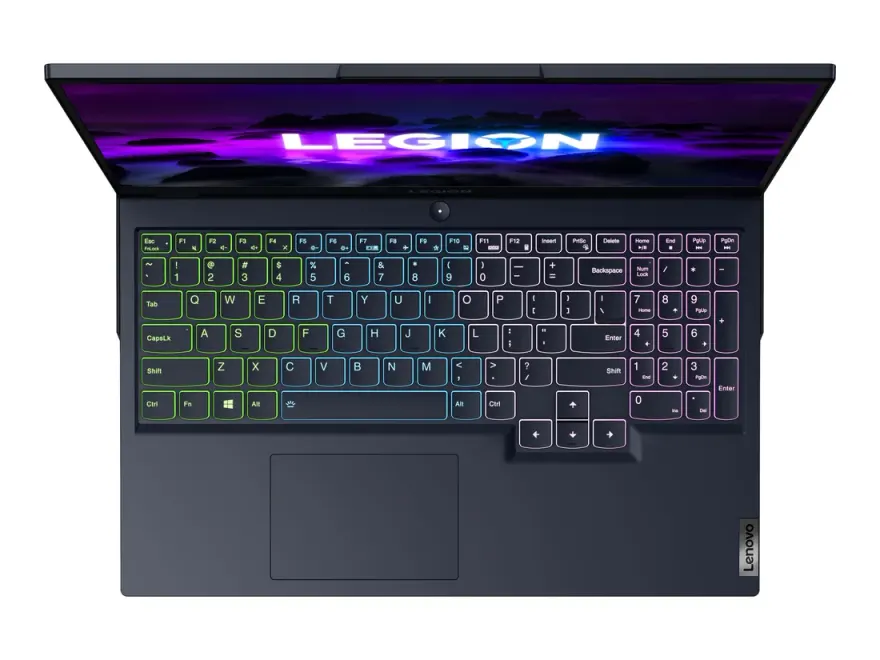
Per-key Aura RGB, 1.7 mm travel, anti-ghosting4-zone RGB, 1.5 mm travel, TrueStrike anti-ghosting
Build
Plastic with stylised lid, RGB light bar across hingeAluminium top + plastic deck, understated minimalist look
Price (N.N Laptops Lahore)
Rs. 195,000Rs. 195,000
Best for
Younger gamers, those who want flashy aesthetics + RGBAdult gamers, students, anyone who carries it to office/uni too
Reliability score
8.0 / 108.5 / 10
Our verdict

Which one should you buy?

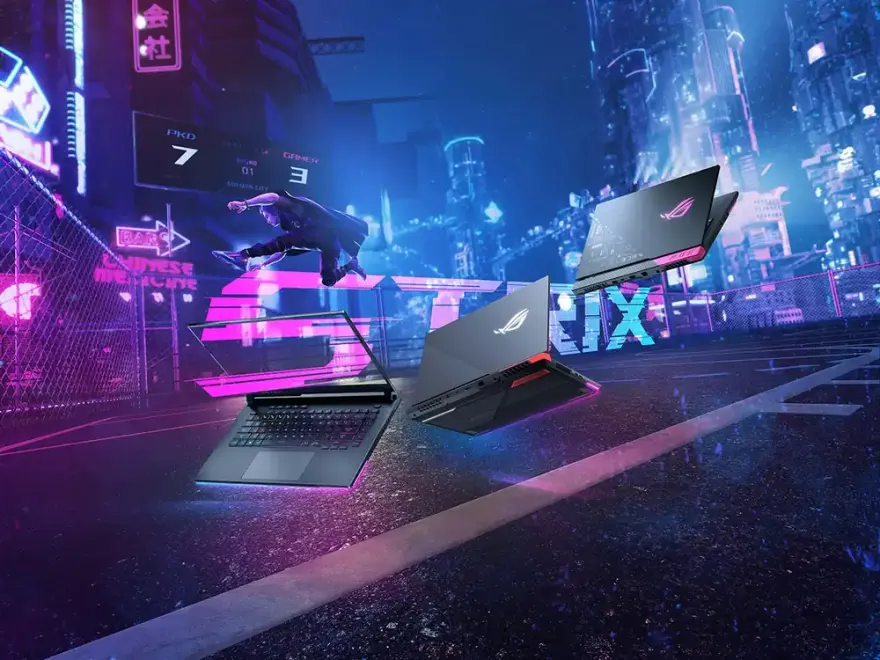
Both run the same Ryzen 7 5800H and the same RTX 3060 6GB at very similar TGPs (115 W on the Strix, 130 W on the Legion 5), so raw FPS in CS2, Valorant, Apex, GTA V, Cyberpunk 2077, and Forza Horizon 5 lands within 3 to 5%. The difference is what you want to look at and carry. The ROG Strix G15 is the more aggressive design — RGB light bar across the hinge, per-key Aura RGB keyboard, plastic chassis with cyberpunk-inspired patterns. It's a laptop that announces it's a gaming laptop. The Legion 5 is the opposite: understated aluminium-topped lid, 4-zone RGB keyboard, no flashy lighting outside the keys. It looks like a normal premium laptop you could carry into a client meeting. The Legion 5 also gets the better panel (165 Hz vs 144 Hz, 100% sRGB measured), higher GPU TGP (130 W vs 115 W), HDMI 2.1 (vs 2.0b — matters for connecting to PS5 / Xbox Series X / 4K 120 Hz monitors), and slightly better thermals because the cooling is more conservative. The Strix gets a slightly bigger battery (90 Wh vs 80 Wh). Pricing in Lahore is essentially identical (Rs. 165,000 to 195,000 used). For Pakistani buyers who use the laptop for both gaming and university/work, the Legion 5 is the better all-rounder. The Strix G15 wins for pure gamers who want the look.

FAQ

Asus ROG Strix G15 vs Lenovo Legion 5 — frequently asked

ROG Strix G15 or Legion 5 — which one is better for gaming?

+

Legion 5 by a small margin. Same CPU and GPU silicon, but the Legion's RTX 3060 runs at 130 W vs the Strix's 115 W (5 to 8% higher FPS in GPU-bound games), and the 165 Hz panel is faster than the Strix's 144 Hz. HDMI 2.1 on the Legion also matters if you ever plug into a console or 4K 120 Hz TV.

Which has better build quality — ROG Strix G15 or Legion 5?

+

Legion 5 — slightly. Both are mostly plastic, but the Legion's aluminium-topped lid resists fingerprints and flex better. The Strix has more stylised plastic that scratches if you carry it in a tight bag. Hinges on both are reliable; we see roughly equal repair volumes at N.N Laptops.

Can either of these run AAA games at 1440p?

+

Both have 1080p panels, so 1440p gaming requires an external monitor. With an external 1440p 144 Hz monitor, the RTX 3060 hits 60 to 90 fps in modern AAA titles at medium-high settings. The Legion 5 wins by 5 to 10 fps because of its higher GPU TGP. Neither is a 1440p-native machine internally.

Battery life for daily use — Strix G15 vs Legion 5?

+

Both deliver 5 to 7 hours of productivity work (browser, Office, video) with the dGPU disabled and panel at 50% brightness. Gaming unplugged is 1.5 to 2 hours on either, with significant performance throttling. Neither is a true 'all-day' laptop — they're plugged-in performance machines.

Which has better RGB lighting customisation?

+

ROG Strix G15 wins clearly. Per-key Aura RGB on the keyboard plus the under-hinge light bar, all controlled through Armoury Crate with deep effect customisation. The Legion 5 has 4-zone RGB only (no per-key control) through Lenovo Vantage. If RGB matters to you, the Strix is the answer.

Can these run modern AAA games at high settings?

+

Yes, at 1080p. RTX 3060 mobile handles Cyberpunk 2077 at 60+ fps high settings with DLSS, Red Dead Redemption 2 at 50-60 fps high, GTA V at 90+ fps very high, Forza Horizon 5 at 80+ fps high. AAA gaming at maxed-out 1080p is well within capability.

Will the RTX 3060 6GB be obsolete in 2 years?

+

Not obsolete, but increasingly limited. 6GB VRAM is already tight for modern AAA titles at high settings — some games (Hogwarts Legacy, The Last of Us Part 1) hit VRAM ceiling at 1080p ultra. For competitive esports at 1080p, the RTX 3060 will remain capable through 2028. For maxed-out AAA at 1080p in 2028, you may need to drop to medium settings.

Can I upgrade RAM and SSD?

+

Yes on both. Both have two SO-DIMM slots (one populated with 16GB) — you can add a second 16GB module for 32GB total (Rs. 10,000-12,000 upgrade). Both have two M.2 NVMe slots — add a second 1TB SSD for Rs. 12,000-15,000. We do upgrades for free with part purchase at our shop.

Do these run hot enough to cause skin discomfort while gaming?

+

The chassis stays cool near the keyboard and palmrest (under 38°C). The rear-bottom and rear-side near GPU exhausts get hot (45-50°C). Don't place these laptops on your bare legs during gaming — use a desk or laptop stand. Cooling pads (Rs. 2,500-4,000 at Hafeez Center) reduce surface temperatures 5-10°C.

Battery life — realistic numbers?

+

Strix G15 (90 Wh): 5-7 hours productivity (browser, Office), 1.5-2 hours gaming with significant FPS throttling. Legion 5 (80 Wh): 5-6 hours productivity, 1.5 hours gaming throttled. Neither is an 'all day' laptop. Treat them as plugged-in performance machines that occasionally work unplugged for an hour or two.

Are these good enough for VR (Oculus Quest 2 connected to PC)?

+

Yes — both meet Oculus Link / Air Link recommended specs. The RTX 3060 6GB handles VR titles like Half-Life Alyx, Beat Saber, Asgard's Wrath at 90 fps comfortably. The Ryzen 5800H 8 cores handle VR-side processing well. For wireless Air Link, also need a strong Wi-Fi 6 router.

Strix G15 or Legion 5 for OBS streaming while gaming?

+

Legion 5 wins. NVIDIA's NVENC encoder on RTX 3060 handles 1080p 60 fps streaming with minimal performance impact (3-5 fps loss). Better thermals on Legion 5 (slightly more conservative cooling tuning) reduces frame drops during sustained streaming sessions. HDMI 2.1 also supports streaming capture card workflows.

Browse more

Other comparisons

See all 24
Stock alerts + Pakistani deals

Get an email when fresh stock arrives.

One email per month, max. We tell you what new used laptops just landed at Hafeez Center, with prices. Skip the WhatsApp-spam — read on your own time. Unsubscribe in one click.

Open WhatsApp chat