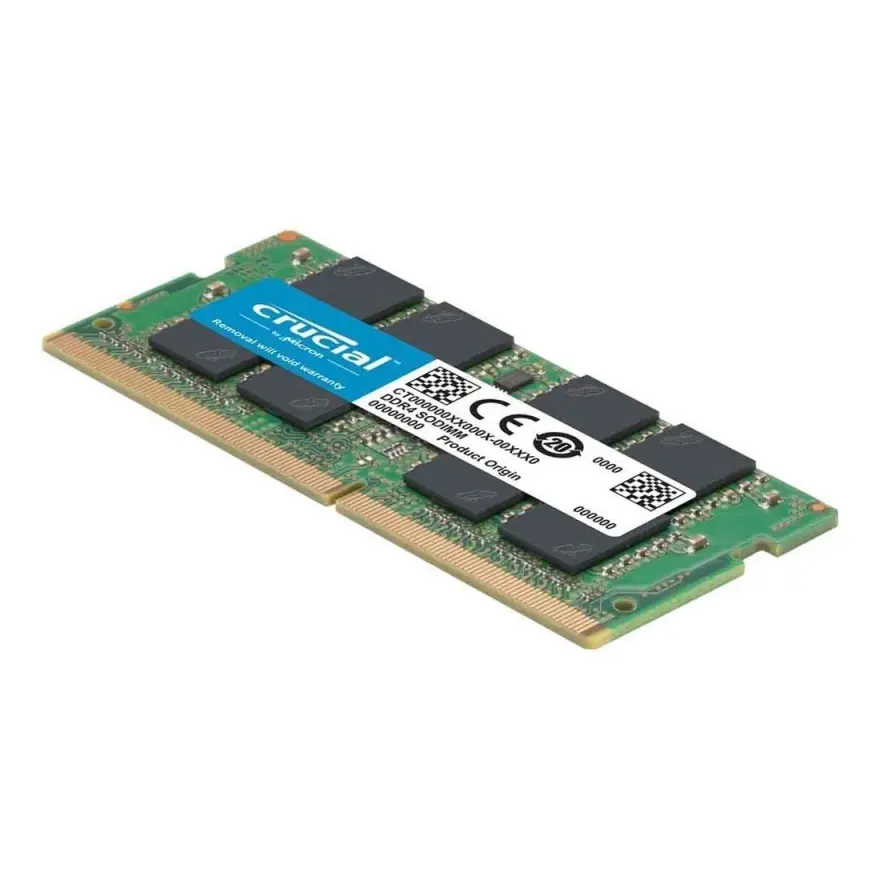
Crucial 8GB DDR4-2400 SODIMM Laptop Memory CL17
The Crucial 8GB DDR4-2400 SODIMM is a new laptop memory module running at 2400 MT/s with CL17 timings on 1.2 V. It's the right choice if you want to take an old 4-8 GB laptop and turn it into a smooth multitasking machine for 2026. At N.N Laptops in Hafeez Center, Lahore, this stick costs Rs. 15,500 with a 30-day replacement warranty and same-day Lahore delivery. Nationwide delivery via TCS/Leopards is also available—just WhatsApp 0314 4000131 to place your order.
This module is quality-checked before shipment to ensure perfect compatibility and performance. It's a JEDEC-standard 260-pin SODIMM that will work in any laptop with a DDR4 slot running at 2400 MT/s or higher—it automatically down-clocks if your system uses a slower speed. We've personally tested it in models like the Asus ROG Strix G15, TUF Gaming F15, VivoBook 15, and ZenBook 14. Not sure if it fits your machine? Drop us a message on 0314 4000131 and we'll confirm before you buy.
Module Specifications
| Brand | Crucial |
|---|---|
| Capacity | 8GB |
| Speed | DDR4-2400 (2400 MT/s) |
| CAS latency | CL17 |
| Voltage | 1.2 V |
| Form factor | 260-pin SODIMM (1.2 V) |
| ECC | Non-ECC, unbuffered |
| Condition | New |
| Warranty | Lifetime brand + 30-day replacement from N.N Laptops |
Why 8GB? Who Is This For?
In 2026, 4GB is obsolete for Windows—the OS alone eats up 2-3GB. 8GB is the minimum for smooth multitasking: office work, 10 Chrome tabs, light photo editing, and even casual gaming like Valorant or Minecraft at low settings. If your laptop currently struggles with slowdowns, adding this 8GB stick (or a matched pair for dual-channel) will transform it. For heavier users—30+ tabs, Photoshop, video calls, or light video editing—16GB is the sweet spot. And for 3D modelling or machine learning, 32GB is best. We stock matched 2x8GB and 2x16GB kits if you want dual-channel performance right away.
Installation & Compatibility Tips
Installing SODIMM RAM is straightforward: power down, remove the bottom cover, locate the slots, press down the metal clips to release any existing module, insert the new one at a 30-degree angle, then press flat until the clips snap. Windows will detect the new RAM automatically. To confirm your laptop uses DDR4 (not DDR3), run the Crucial System Scanner or open Task Manager > Performance > Memory—the notch position on DDR4 modules is different from DDR3, so they're not interchangeable. We recommend dual-channel mode (two identical sticks) for a 10-25% real-world performance boost, especially on laptops with integrated graphics that share system memory.
Where to Buy in Pakistan
This Crucial 8GB DDR4-2400 SODIMM is available at our shop: N.N Laptops, Shop 66A, 3rd Floor, Hafeez Center, Gulberg III, Lahore. Walk-in customers welcome. We also deliver nationwide—free in Lahore on the same day, and via TCS/Leopards to cities like Karachi, Islamabad, Rawalpindi, Faisalabad, Multan, Peshawar, and Sialkot. For the best Crucial 8GB DDR4-2400 SODIMM Laptop Memory CL17 price in Pakistan 2026, you're looking at Rs. 15,500 with a solid warranty. Message 0314 4000131 for live photos, compatibility checks, or to order. Pair this RAM with an SSD from our memory catalogue for a complete upgrade.
Frequently asked questions: Will this fit my Dell Latitude 7490? Yes—it has two DDR4 SODIMM slots at 2400 MT/s. Should I buy DDR4-2666 or 3200? If your CPU supports 3200 (10th-gen Intel or Ryzen 4000+), go with 3200 for future-proofing. Is it brand-new, sealed? Yes, in retail packaging with manufacturer warranty card. How long does laptop RAM last? DDR4 modules reliably last 10-15 years with no moving parts—warranties reflect this confidence. WhatsApp 0314 4000131 for any questions.