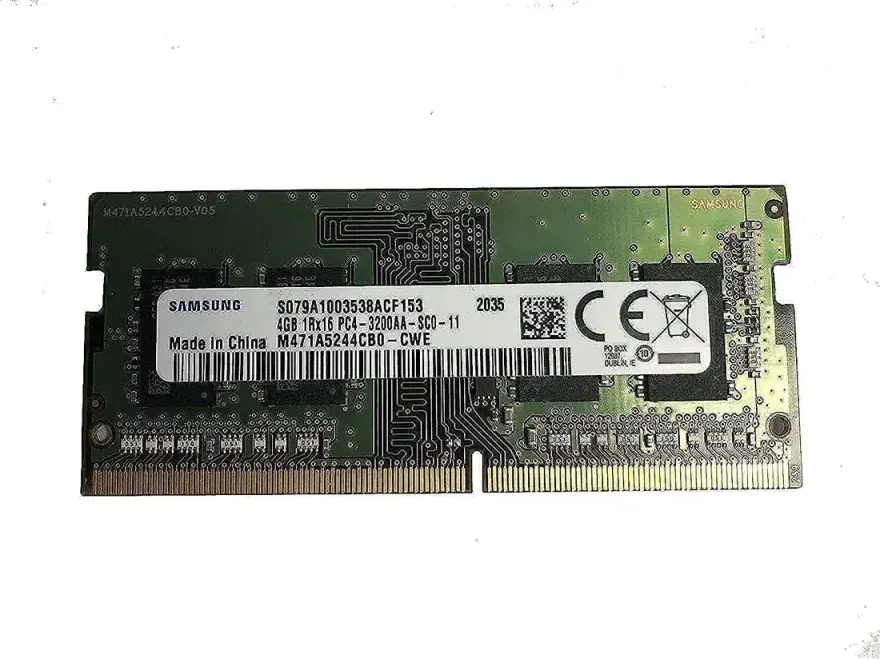
Samsung 16GB DDR4-3200 SODIMM Laptop Memory CL22
The Samsung 16GB DDR4-3200 SODIMM is a new laptop memory module running at 3200 MT/s with CL22 timings on 1.2 V. It's the right choice if you want to take an old 4-8 GB laptop and turn it into a smooth multitasking machine for 2026. At N.N Laptops in Hafeez Center, Lahore, this stick costs Rs. 22,000 with a 30-day check warranty and Lahore delivery. For the latest pricing and availability on new sealed units, check the price on nnlaptops.com or WhatsApp 0314 4000131.
Module specifications
| Brand | Samsung |
|---|---|
| Capacity | 16GB |
| Speed | DDR4-3200 (3200 MT/s) |
| CAS latency | CL22 |
| Voltage | 1.2 V |
| Form factor | 260-pin SODIMM (1.2 V) |
| ECC | Non-ECC, unbuffered |
| Condition | New |
| Warranty | Lifetime brand + 30-day N.N Laptops replacement |
Which laptops accept this RAM?
Any laptop with a DDR4 SODIMM slot running at 3200 MT/s or higher. The module is JEDEC-standard and down-clocks automatically if your laptop's CPU/chipset runs slower. We have personally tested it in Acer Aspire 5, Predator Helios 300, Swift 3, Nitro 5, Lenovo ThinkPad T480, HP ProBook 450 G6, and Dell Latitude 5490. WhatsApp 0314 4000131 with your laptop model and we'll confirm before shipment. See matched memory kits for the full memory catalogue.
How to confirm DDR4 vs DDR3
Run Crucial System Scanner or open Task Manager > Performance > Memory. The exact type is shown. DDR4 SODIMMs have the notch in a different position from DDR3, so the two are not interchangeable.
How much RAM does a 2026 laptop actually need?
- 4 GB: obsolete. Windows alone uses 2-3 GB. Avoid for any productivity use.
- 8 GB: fine for office, Chrome (up to 10 tabs), light photo editing, casual gaming.
- 16 GB: sweet spot for 2026 — handles Chrome 30+ tabs, Photoshop, video calls, Visual Studio, light gaming all at once.
- 32 GB: for video editors, 3D modellers, machine-learning students, gamers with many background apps.
Single stick or matched pair?
If your laptop has two SODIMM slots, two matching modules in dual-channel mode are noticeably faster than a single stick of the same total size — especially on iGPU-based laptops where the graphics chip shares system memory. We sell matched 2 x 8 GB and 2 x 16 GB kits at a small premium and recommend them whenever your laptop allows two slots.
Installation
Power down, remove the bottom cover, find the SODIMM slots (typically two stacked vertically). Press down on the metal clips to release any existing module, then push the new module in at a 30° angle and press flat until the clips snap. Reassemble and boot — Windows will detect the new RAM automatically. See laptop parts catalogue for dual-channel kits.
Why upgrade to 16GB in 2026?
Modern operating systems and applications are increasingly memory-hungry. An 8GB laptop can quickly run out of headroom when you have multiple browser tabs, a video call, and a document editor open simultaneously. Upgrading to 16GB gives you a buffer that keeps your system responsive. This Samsung DDR4-3200 stick is a cost-effective way to breathe new life into a laptop that feels sluggish — just ask our customers across Lahore, Karachi, Islamabad, Rawalpindi, Faisalabad, Multan, Peshawar, and Sialkot who have done exactly that. The price in Pakistan for this Samsung 16GB DDR4-3200 SODIMM is Rs. 22,000 (new sealed pack), and it's available at N.N Laptops.
Our quality guarantee
Every module we sell is quality-checked before dispatch. For new stock, we ensure it boots and runs at rated speed in our test bench. If you encounter any issue, we offer a 30-day replacement warranty on top of the manufacturer's lifetime warranty. That's peace of mind when you buy from Shop 66A, 3rd Floor, Hafeez Center, Gulberg III, Lahore. We deliver free within Lahore on the same day, and nationwide via TCS or Leopards for a nominal fee. WhatsApp 0314 4000131 to confirm compatibility or to place an order — Sayam will handle your query personally.
Frequently asked questions
Will this 16GB DDR4-3200 module fit my Dell Latitude 7490?
Yes — the Latitude 7490 has two DDR4 SODIMM slots running at 2400 MT/s. This module is downward compatible. WhatsApp 0314 4000131 with your exact model to confirm.
DDR4-2666 vs 3200 — which should I buy?
If your laptop's CPU supports 3200 MT/s (most 10th-gen+ Intel and Ryzen 4000+ models), buy 3200 — it down-clocks if needed and you have a faster spare for future builds. If you're on an older 7th-9th gen Intel machine, 2666 is fine and slightly cheaper.
Should I use single-channel or dual-channel?
Always dual-channel where possible. Two matching SODIMMs give roughly 10-25% real-world performance gain over a single module, especially in iGPU gaming and video editing. Ask us about matched kits.
Is this a brand-new sealed module?
Yes — sealed retail packaging with manufacturer warranty card. The price on nnlaptops.com reflects the new condition at Rs. 22,000.
How long does laptop RAM last?
DDR4 has no moving parts. In practice, well-cooled SODIMMs last 10-15 years without degrading. The lifetime warranty on new sticks reflects this.