Direct answer
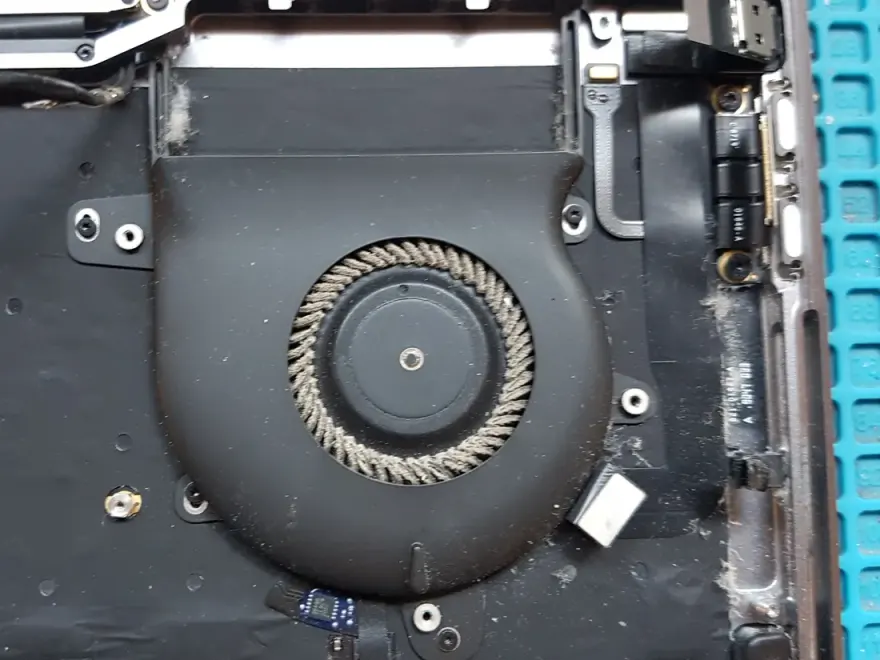
The MacBook Pro 13 2018 2019 A1989 Left Side Cooling Fan is a tested left-side cooling fan for MacBook Pro 13 inch 2018-2019 replacement part designed for the MacBook Pro 13 2018 A1989, 2019 A2159. It costs Rs. 6,399 at N.N Laptops, Hafeez Center, Gulberg III, Lahore, comes with a 30-day check warranty, and is bench-tested before dispatch. Same-day pickup in Lahore and with nationwide delivery via TCS / Leopards via TCS or Leopards.
At just Rs. 6,399 (the current updated price), this OEM-pulled fan delivers reliable cooling for your MacBook Pro 13 at a fraction of the cost of a new Apple part. Whether you're in Lahore, Karachi, Islamabad, Rawalpindi, Faisalabad, Multan, Peshawar, or Sialkot, we ship nationwide via TCS or Leopards with same-day delivery in Lahore. Our warehouse at Hafeez Center, Gulberg III, Lahore, has been serving customers since 2016, and every fan is bench-tested on a working motherboard before it leaves our shop.
Why this fan matters for your MacBook Pro 13
A failing left-side fan doesn't just cause noise—it leads to CPU throttling, sudden shutdowns, and accelerated wear on the logic board. Replacing it with this tested pull is a smart move. It uses the authentic Apple 4-pin connector and runs on 5V DC, exactly matching the original specs. Many customers in Lahore order this part for overheating laptops that run CPU at 1 GHz throttled clock, grinding or clicking sounds, or a BIOS fan error at boot. It's also commonly paired with a CPU repaste on machines over 4 years old.
Compatibility — which laptops fit this part?
This macbook pro 13 2018 2019 a1989 left side cooling fan is verified to fit the following laptop models. We physically test the part on a known-good chassis before shipping to confirm seating, connector pinout, and electrical behaviour. If your model is similar but not listed, WhatsApp 0314 4000131 with your full service tag or model number and we will confirm fit in minutes.
- Confirmed models: MacBook Pro 13 2018 A1989, 2019 A2159
- Connector type: Apple 4-pin
- Pulled from: Tested working donor unit, no impact damage, no liquid corrosion
Specifications at a glance
| Connector | Apple 4-pin |
|---|---|
| Voltage | 5V DC |
| Compatibility | A1989 and A2159 |
| Type | OEM pulled |
Real-world use cases
Customers in Lahore typically order this part for the following repair scenarios:
- Laptop overheating, shutting down under load, or running CPU at 1 GHz throttled clock
- Fan making grinding, clicking, or constant high-pitched whine
- Fan refusing to spin at boot (BIOS fan error)
- Preventive replacement when re-pasting CPU on a 4+ year old laptop
Installation guidance
The replacement is straightforward for any technician with basic laptop disassembly experience. A walkthrough:
- Power off the laptop, disconnect the charger and (where removable) the battery.
- Remove the bottom case fasteners using a PH00 screwdriver.
- Lift the bottom cover starting from a corner with a plastic spudger.
- Disconnect the fan power connector from the motherboard.
- Unscrew the heatsink/heat-pipe mounting screws in the diagonal sequence printed on the heat-spreader.
- Lift the old fan + heat-pipe assembly cleanly off the CPU/GPU dies.
- Clean residual thermal paste from CPU/GPU with isopropyl alcohol, apply fresh paste (rice-grain size), seat new fan and screw down in reverse diagonal order.
- Reconnect the fan power, test idle and stress temps before reassembly.
Tools you will need
Philips PH00 screwdriver, plastic spudger or guitar pick, ESD wrist strap, anti-static surface, and a small parts tray. If you do not have these, we offer in-shop installation at Hafeez Center for a flat Rs. 6,399 fitting fee — usually completed within 45 minutes.
What to test after install
Boot the laptop, verify the component is detected in Device Manager (Windows) or System Report (macOS), run a stress test for 10-15 minutes, and confirm no unusual heat or noise. Our 30-day check warranty covers exactly this validation window.
Why buy from N.N Laptops
We have been the trusted laptop spare-parts vendor in Hafeez Center since 2016. Every internal part we sell is pulled from a working donor unit, cleaned, bench-tested, and labelled with the donor model. We don't ship guess-work parts. You also get the option to walk in and watch the test before you buy — try getting that from an online-only seller.
Pair this part with our compatible MacBook Pro 13 2018 A1989 full laptop thermal paste syringe compatible heat-pipe assembly for a complete repair.
Frequently asked questions
Is this cooling fan original or compatible?
It is an OEM-pulled original part removed from a working MacBook Pro 13 2018 A1989 donor unit. It is not aftermarket plastic. Each unit is bench-tested before listing and labelled with the donor service tag.
How do I know my model is compatible?
WhatsApp your laptop service tag or full model number to 0314 4000131. We will pull up the BOM in 2-3 minutes and confirm exact compatibility. Most parts in this listing fit a 2-3 generation range, so chances are high your model is covered.
Do you offer in-shop installation?
Yes. Walk in to Shop 66A, Hafeez Center for in-shop installation at a flat Rs. 6,399 fitting fee. Most replacements are done in 30-60 minutes while you wait. We do not charge a diagnostic fee if you buy the part from us.
What if the part does not work in my laptop?
You are covered by our 30-day check warranty. If the part is genuinely faulty or incompatible, we refund or exchange — no restocking fee — as long as the part shows no signs of incorrect installation.
Can I get in Karachi or Islamabad?
Yes. We ship Pakistan-wide via TCS and Leopards. Delivery takes 2-4 working days outside Lahore. is available in every TCS-served city. Rs. 6,399 is the -eligible product price; a small courier handling charge applies.
Where to buy in Lahore
Walk in to Shop 66A, 3rd Floor, Hafeez Center, Gulberg III, Lahore, or message 0314 4000131 on WhatsApp. We are open Monday to Saturday, 11 AM to 9 PM. Sundays we answer WhatsApp orders only. via TCS or Leopards reaches every Pakistani city in 2-4 working days.
Order through WhatsApp 0314 4000131 or visit Shop 66A, 3rd Floor, Hafeez Center, Gulberg III, Lahore. We offer Lahore delivery, with nationwide delivery via TCS and Leopards, and a 30-day check warranty on every item we sell. Pakistan-wide shipping in 2-4 working days.
If your MacBook Pro 13 is overheating, shutting down randomly, or making grinding fan noises, the left-side cooling fan is often the root cause. This OEM-pulled fan for the 2018 2019 A1989 / A2159 models is bench-tested and ready to restore thermal performance. At Rs. 6,399, it remains the most cost-effective solution for MacBook Pro 13 owners across Pakistan in 2026. We've sold hundreds of these fans to customers in Lahore, Karachi, Islamabad, Rawalpindi, Faisalabad, Multan, Peshawar, and Sialkot — and every single one is tested on a working donor board before dispatch. Our 30-day check warranty gives you peace of mind, and if you're local, come by Shop 66A, 3rd Floor, Hafeez Center, Gulberg III, Lahore to see the test yourself. For nationwide orders, WhatsApp 0314 4000131 — we'll send you live photos and video of the exact unit you'll receive. No guesswork, no surprises.