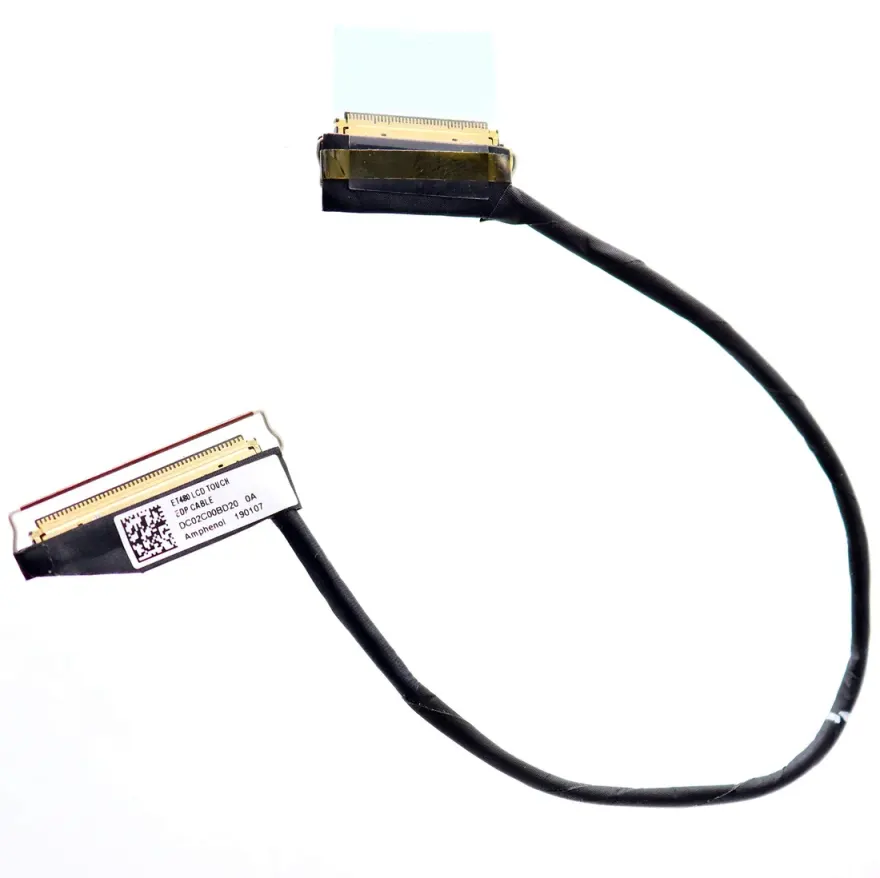
Direct answer — what is the Lenovo ThinkPad T480 / T490 LCD LVDS Cable — 30-Pin FHD?
The Lenovo ThinkPad T480 / T490 LCD LVDS Cable — 30-Pin FHD is the LVDS / eDP flex cable that carries display signal from the motherboard to the LCD panel — a thin, ribbon-style flat cable with a 30-pin eDP connector at the screen end. Replace this cable when the screen flickers, shows colour banding when the lid is angled, or goes blank at certain hinge positions. Available for Rs. 1,599 at N.N Laptop, Hafeez Center, Lahore. As of 2026, the current price is Rs. 1,599—a small adjustment reflecting the cost of thoroughly bench-tested donor cables.
Every cable we list has been pulled from a working donor laptop and then bench-tested for full continuity across all 30 pins. A single broken conductor can cause missing colors or an intermittent display, so we take no shortcuts. This is the same original-spec part used by Lenovo, not a cheap aftermarket substitute.
Laptop models this display cable fits
| Laptop Model | Variant / Generation | Notes |
|---|---|---|
| Lenovo ThinkPad T480 | 2018 FHD | Direct fit |
| Lenovo ThinkPad T490 | 2019 FHD | Direct fit |
If you own a T480s or T490s, the chassis and routing differ. Always check your original cable connector and pin count before ordering. Send a clear photo of the old cable to Sayam on WhatsApp 0314 4000131 for instant confirmation.
Specifications
| Specification | Detail |
|---|---|
| Connector | 30-pin eDP |
| Cable Length | Original OEM length |
| Signal Type | eDP differential pair |
| Shielding | Original foil + braid shielding |
| Touch Support | Non-touch FHD only |
| Condition | Used – Tested, full continuity check |
| Warranty | 30-day check warranty |
This cable is specifically for non-touch FHD panels. Touchscreen variants use a different multi-pin cable—verify by counting pins on your old cable.
How to know your display cable has failed
The Lenovo ThinkPad T480 T490 LVDS cable fails after years of opening and closing the lid — the cable flexes thousands of times and eventually a conductor cracks. Classic symptoms: the screen flickers when you wiggle the lid, vertical lines appear at certain hinge angles, the display goes completely blank when nearly closed, or one of the colour channels (red, green, blue) drops out. None of these means your screen is dead — replace the cable first.
Diagnostic test
Connect an external monitor via HDMI / DisplayPort. If the external monitor shows a clean picture, the GPU is fine and the issue is the panel or the cable. Wiggle the lid: if the laptop display reacts to lid movement, replace the cable first — it's 5x cheaper than the panel. This diagnostic method has saved countless customers from buying an expensive screen unnecessarily. We've seen it happen—customers come in with a dead screen, we swap the cable, and it works perfectly.
Installation
This is a 30-minute repair. You'll pry the bezel, unscrew four LCD mounting screws, lay the panel forward, peel the cable's adhesive backing off the panel, unclip the connector and replace with this unit. Route the new cable through the hinge channel exactly as the original — twisted routing will fail again.
What's in the box
- 1 × Lenovo ThinkPad T480 / T490 LCD LVDS Cable — 30-Pin FHD
- Adhesive replacement strip
- Cable routing guide for the listed models
We package each cable carefully to avoid damage during shipping. For local Lahore customers, we offer same-day delivery within city limits. For orders to Karachi, Islamabad, Rawalpindi, Faisalabad, Multan, Peshawar, Sialkot, and other cities, we ship via TCS or Leopards with tracking. Just WhatsApp Sayam at 0314 4000131 with your address and we'll arrange quick delivery.
Buy from N.N Laptop, Lahore
We test every flex cable on a multimeter for continuity across all conductors before listing — no surprise dead conductors. Walk in to Shop 66A, Hafeez Center, Gulberg III for same-day pickup, or order online for nationwide delivery. WhatsApp 0314 4000131 with your laptop model to double-check the part number. See more laptop replacement parts and LCD panels.
30-day check warranty
Install, test, and if the cable shows any signal issue within 30 days bring it back with the invoice for free replacement. Cables are delicate — handle by the rigid connector ends, never bend at sharp angles, and route through the hinge channel exactly as the original.
Frequently asked questions
Is this a new or used cable?
This is a pulled-tested cable from a working donor laptop, tested for continuity and signal integrity. Many failures are conductor cracks from years of lid-flex; a healthy donor cable will outlast another panel cycle.
Will this cable fit my Lenovo ThinkPad T480?
Yes. This is the original-spec part for Lenovo ThinkPad T480 and all variants in the compatibility table. The 30-pin eDP connector matches the motherboard side exactly.
My screen flickers — is it the cable or the screen?
Most likely the cable. Test: connect an external monitor — if external works fine and the laptop screen flickers when you angle the lid, replace the cable first. Cables fail far more often than panels.
Does this support touch displays?
This is a standard non-touch eDP cable. Touch variants of this laptop use a different multi-pin cable — confirm by counting pins on your old cable before ordering.
Can you install it for me?
Yes — Lahore walk-in installation costs Rs. 1,599 and takes 30 minutes. Free if you buy panel + cable together for a complete display repair.
What if my laptop is not listed in the table?
Laptops like the T480s and T490s have different internal layouts. If you're unsure, send a photo of your old cable to 0314 4000131 and we'll confirm compatibility within minutes.
Order today
Don't replace the screen until you've tried the cable. Order this Lenovo ThinkPad T480 T490 LVDS cable for nationwide delivery or WhatsApp 0314 4000131 to confirm the right part for your serial number. At just Rs. 1,599, it's the most affordable fix for a flickering or blank display. Visit us at nnlaptops.com for more details.