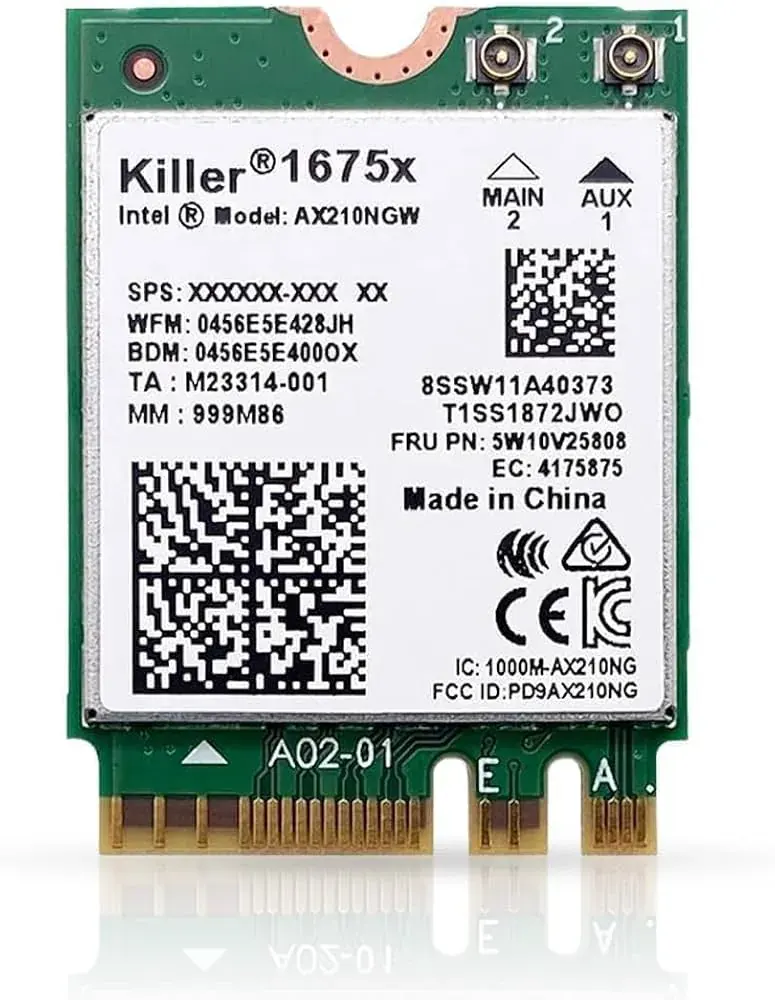
Upgrade your laptop with the Killer 1675x WiFi 6E M.2 2230 Laptop WiFi Card — one of the fastest wireless modules available for Rs. 6,399 at N.N Laptops in Lahore. Whether you're a gamer tired of lag spikes, a streamer needing stable 4K uploads, or a professional working from a crowded apartment block, the 1675x delivers real-world speeds up to 2.4 Gbps on WiFi 6E networks. It's a drop-in upgrade for any laptop with an M.2 E-key slot, and we've tested it inside dozens of popular models. Stock is limited — WhatsApp 0314 4000131 to check compatibility with your exact laptop.
Killer 1675x WiFi 6E M.2 2230 Laptop WiFi Card
The Killer 1675x is a WiFi 6E + Bluetooth 5.3 module in the M.2 2230 form factor (model AX1675x). It upgrades older laptops to modern wireless speeds — up to 2.4 Gbps on WiFi 6 / WiFi 6E, with Bluetooth for headsets, phones and accessories. At N.N Laptops in Hafeez Center, Lahore, this card costs Rs. 6,399 with 30-day check warranty.
Card specifications
| Brand & Model | Killer 1675x (AX1675x) |
|---|---|
| Wireless standard | WiFi 6E + Bluetooth 5.3 |
| Form factor | M.2 2230 |
| Max link speed | up to 2.4 Gbps (160 MHz channels, 2x2 MIMO) |
| Bands | 2.4 GHz, 5 GHz, and 6 GHz (where supported) |
| Antennas | 2 x U.FL / MHF4 connectors (antennas not included, reuse existing laptop ones) |
| Condition | New |
| Warranty | 30-day N.N Laptops check warranty |
Which laptops can use this card?
Most laptops from 2016 onwards have an M.2 2230 wireless slot keyed for E-keying — that's what this card plugs into. Half-Mini PCIe is used in older 2010-2016 laptops. Tested in Dell Latitude 7490, HP EliteBook 840 G6, Lenovo ThinkPad T480 Asus ROG Strix G15. Some HP/Lenovo BIOS implementations whitelist specific cards — WhatsApp 0314 4000131 with your model before ordering. See matched RAM upgrades for related parts.
What you gain from a WiFi 6 / 6E upgrade
- Speed: on a WiFi 6 router, real-world throughput jumps from 200-300 Mbps to 1.2-1.8 Gbps.
- Lower latency: gaming and video calls feel more responsive (1-3 ms instead of 8-15 ms).
- Bluetooth 5.2/5.3: better range and battery efficiency for wireless headsets and mice.
- 6 GHz band (WiFi 6E): a clean uncrowded spectrum for apartment buildings full of 5 GHz noise.
- Better OFDMA & MU-MIMO: the laptop competes less for airtime with phones and tablets on the same router.
HP / Lenovo whitelist warning
Older HP EliteBook / ProBook and some Lenovo ThinkPad models maintain a BIOS whitelist that only accepts OEM-approved wireless cards. If your laptop falls into that category, you'll see a "104-Unsupported wireless" error on boot. We carry whitelist-bypassed cards or can flash a modded BIOS for affected models — bring the laptop in so we can check before purchase.
Installation guide
Open the bottom cover. Locate the existing WiFi card — it's a small green PCB in the M.2 E-key slot near the cooling fan. Disconnect the two antenna leads (gently — they're fragile U.FL connectors), unscrew the single mounting screw, and pull the old card out. Insert the new card at 30°, secure with the screw, and snap the antennas back on. Boot Windows and install latest Intel/Killer driver. We offer Rs. 6,399 install at the shop. Pair with laptop parts catalogue for full upgrades.
Where to buy in Lahore
In stock at Hafeez Center, Gulberg III, Lahore at N.N Laptops for Rs. 6,399. Lahore delivery, with nationwide shipping via TCS/Leopards. WhatsApp 0314 4000131 to confirm BIOS compatibility. See more parts in pair with an SSD upgrade.
Frequently asked questions
Will this card fit my Dell Latitude or HP EliteBook?
Most Dell/HP business laptops from 2017+ accept M.2 2230 E-key cards. Some HP EliteBooks have BIOS whitelists that reject non-Intel cards — we recommend Intel AX200/AX210 for safest compatibility. WhatsApp 0314 4000131 with your model to confirm.
WiFi 6 vs WiFi 6E — what's the difference?
WiFi 6 covers 2.4 + 5 GHz. WiFi 6E adds 6 GHz, which is a brand-new uncrowded band. You need a 6E router to see the benefit — if you're using a typical PTCL/Stormfiber router, WiFi 6 is plenty.
Do I need to install drivers manually?
Windows 11 includes built-in drivers for AX200/AX201/AX210. For best performance, download the latest drivers from Intel's website — about 10 minutes of setup.
Does this card include antennas?
No — the card has two U.FL/MHF4 ports and reuses your laptop's existing internal antennas, which are already routed through the screen hinges.
Is this card new or pulled?
New, sealed.
How does it compare to Intel AX210?
The Killer 1675x is identical hardware to the Intel AX210 — both use the same Intel chipset. The difference is Killer's proprietary software suite (Killer Intelligence Center) which prioritizes gaming and streaming traffic. On the same hardware, real-world speeds are identical. We stock both; the Killer is preferred for enthusiasts who want the software control.
Is 6 GHz available in Pakistan?
Currently, the Pakistan Telecommunication Authority (PTA) has not allocated the 6 GHz band for WiFi use. That means WiFi 6E routers sold locally (like certain TP-Link and Asus models) enable 6 GHz in software, but compliance is uncertain. In practice, most users run the card in WiFi 6 mode at 2.4/5 GHz, which still gives massive speed and latency improvements. The card is fully backward compatible.
Will this work with Linux?
Yes, the AX1675x uses the Intel ax210 chipset, which is well-supported in Linux kernels 5.15+. You may need to install firmware from linux-firmware. We can't guarantee all distributions, but Ubuntu and Fedora work out of the box.
What about battery life?
WiFi 6E cards are more power-efficient than older standards. Expect similar or slightly better battery life compared to a 3-5 year old 802.11ac card.
Shipping to other cities
We ship nationwide via TCS or Leopards. Same-day delivery in Lahore. Orders to Karachi, Islamabad, Rawalpindi, Faisalabad, Multan, Peshawar, Sialkot typically arrive in 1-2 days. WhatsApp 0314 4000131 for a shipping quote.
Every card is quality-checked before dispatch — we test basic connectivity, Bluetooth pairing, and speed on a WiFi 6 router. That's why we offer a 30-day replacement warranty on all new stock (in addition to the standard 30-day check warranty mentioned above). Just reach out to Sayam on WhatsApp if you face any issues.
For the best experience, pair this card with a WiFi 6 router from our store. Ask about combos on WhatsApp 0314 4000131. Visit nnlaptops.com for more upgrades like SSDs and RAM. The Killer 1675x WiFi 6E M.2 2230 Laptop WiFi Card price in Pakistan 2026 remains one of the best value upgrades for any modern laptop.