Dell Latitude 7420 replacement touchpad module
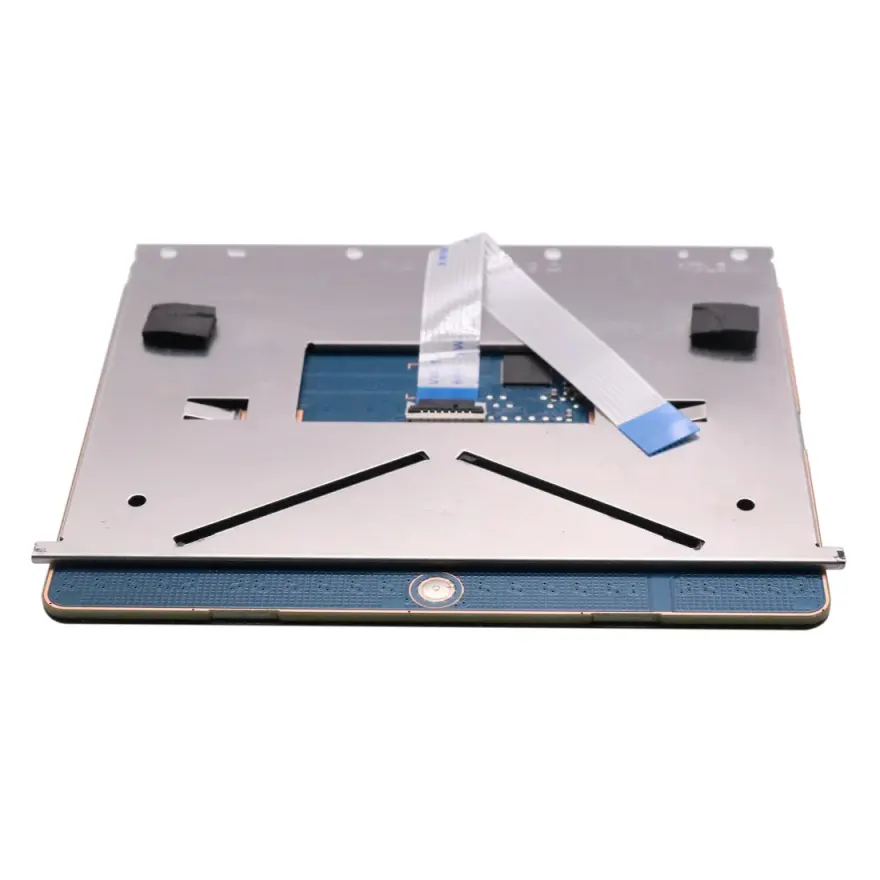
The Dell Latitude 7420 touchpad is a standalone multi-touch trackpad module — glass or coated-plastic surface with integrated Mylar ribbon — for Latitude 7420 and 7410, 7400 laptops manufactured around 2021. Drop-in replacement for a non-responsive, cracked, or scratched original touchpad. Tested, in stock, and available at N.N Laptops, Hafeez Center, Lahore.
At Rs. 2,599, this touchpad module offers a cost-effective fix for a common failure point on a premium business laptop. Whether you're in Lahore, Karachi, Islamabad, or Rawalpindi, you can get this part delivered quickly. In Lahore, we offer same-day delivery; for other cities, we ship via TCS or Leopards — typically arriving in 1-2 business days. Every unit is bench-tested for all gestures before listing, so you're not gambling on a used part from an unknown source.
What's included
This listing is the standalone touchpad module — the trackpad surface plus its mounting bracket and FFC ribbon cable. It does not include the palmrest (C panel) — if your touchpad crack extends into the palmrest itself, you may need the full C panel instead. Send us a WhatsApp photo before ordering and we will tell you which part you actually need.
Common symptoms that mean you need a new touchpad
- Pointer jumps or freezes randomly during use.
- Left or right click stops registering after pressing.
- Two-finger scroll behaves erratically or scrolls in the wrong direction.
- Visible cracks or scratches on the trackpad surface.
- Touchpad disappears from Device Manager despite a clean Windows install.
- Multi-touch gestures (pinch zoom, three-finger swipe) no longer work.
All of the above are symptoms of either a failed Mylar sensor layer or a broken FFC ribbon inside the module — both of which are fixed by a full module swap, not by software.
Detailed specifications
| Brand | Dell |
|---|---|
| Compatible Models | Latitude 7420, Latitude 7410, Latitude 7400 |
| Surface | Coated glass / Mylar — multi-touch, gesture-capable |
| Connector | FFC ribbon — direct to motherboard |
| Buttons | Integrated left/right click (no separate clicker buttons) |
| Condition | Used — fully tested, every gesture verified |
| Warranty | 30-day check warranty |
| Stock Location | Shop 66A, 3rd Floor, Hafeez Center, Gulberg III, Lahore |
Confirmed compatibility
The following Dell laptop variants accept this exact touchpad module — same screw pattern, same FFC ribbon pin-out:
| Latitude 7420 | Direct fit |
|---|---|
| Latitude 7410 | Cross-compatible |
| Latitude 7400 | Cross-compatible |
This touchpad is also compatible with several Dell Latitude models from the same generation, making it a versatile spare for repair shops and IT departments. If you're unsure about compatibility, simply WhatsApp your laptop's service tag to 0314 4000131 and Sayam will confirm within minutes.
Installation guide
Tools and prep
You will need a Phillips PH00 screwdriver, a plastic spudger, and an anti-static mat. Set aside roughly 30-45 minutes for the swap. Photograph the inside of the laptop before you start so you have a reference for screw placement.
Steps in brief
The Dell Latitude 7420 touchpad is mounted to the underside of the palmrest with 3-6 small screws plus an FFC ribbon to the motherboard. Disassembly requires removing the bottom case, disconnecting the battery, removing the keyboard frame, then lifting out the old touchpad. Reverse the steps with the new module. Typical install time is 30-45 minutes for an experienced technician.
Who should buy this?
This replacement touchpad is ideal for users who want to extend the life of their Latitude 7420 without spending on a new laptop. It's also perfect for second-hand resellers refreshing inventory, or for IT managers maintaining fleet laptops. The 30-day check warranty gives you peace of mind — if it doesn't work, we replace it.
Why buy this touchpad from N.N Laptops
Touchpads are one of the most-failed components on heavily used laptops — daily contact, spilled drinks, fingernail wear, and accidental drops all take their toll. Replacing one is usually three times cheaper than replacing the entire palmrest and ten times cheaper than replacing the laptop. Every touchpad we sell is harvested from a clean donor unit, then verified for gesture support on a working chassis before listing. No DOA stock, no surprises.
Where to buy and warranty
In stock at Shop 66A, 3rd Floor, Hafeez Center, Gulberg III, Lahore. Order via WhatsApp 0314 4000131. Every touchpad ships with our 30-day check warranty — install, test, return if defective. Lahore delivery; nationwide delivery via TCS or Leopards Courier. You can also view all laptop input parts, check compatible keyboards, or see related laptop panels on the online store.
Frequently Asked Questions
Does this touchpad need new drivers?
No — Windows 10 and 11 recognise the Dell Latitude 7420 touchpad with built-in Precision Touchpad drivers. After installation, all gestures (two-finger scroll, three-finger swipe, pinch zoom) work out of the box.
Can you install it in-shop?
Yes — bring the laptop to Shop 66A, 3rd Floor, Hafeez Center, Gulberg III, Lahore. Touchpad replacement is a 30-45 minute job. Labour discounted when you buy the part from us. Same-day turnaround typically.
Will my fingerprint reader still work?
Yes — the touchpad and fingerprint reader are separate modules in the Dell Latitude 7420. Replacing the touchpad has no effect on the fingerprint reader, webcam, or other peripherals.
What if the touchpad doesn't respond after installation?
Most 'dead' touchpad issues after install are caused by an improperly seated FFC ribbon. Reseat the cable firmly. If still dead, WhatsApp us at 0314 4000131 — we guide you through a quick test. All touchpads are tested-working before shipping and covered by our 30-day check warranty.
About N.N Laptops
N.N Laptops is Lahore's go-to destination for laptop spare parts and on-site repair, operating from Hafeez Center for over eight years. We test every part on working hardware before listing — no guesswork, no return hassle. Walk in for a free fitment check, or message WhatsApp 0314 4000131 with your laptop service tag and we will confirm the right touchpad module before you buy.
Ordering is simple: WhatsApp 0314 4000131 with your laptop model and we'll reserve a unit. You can also visit our shop at Hafeez Center, Gulberg III, Lahore for a free fitment check. All stock is tested in-house — no dead parts, no hassle.