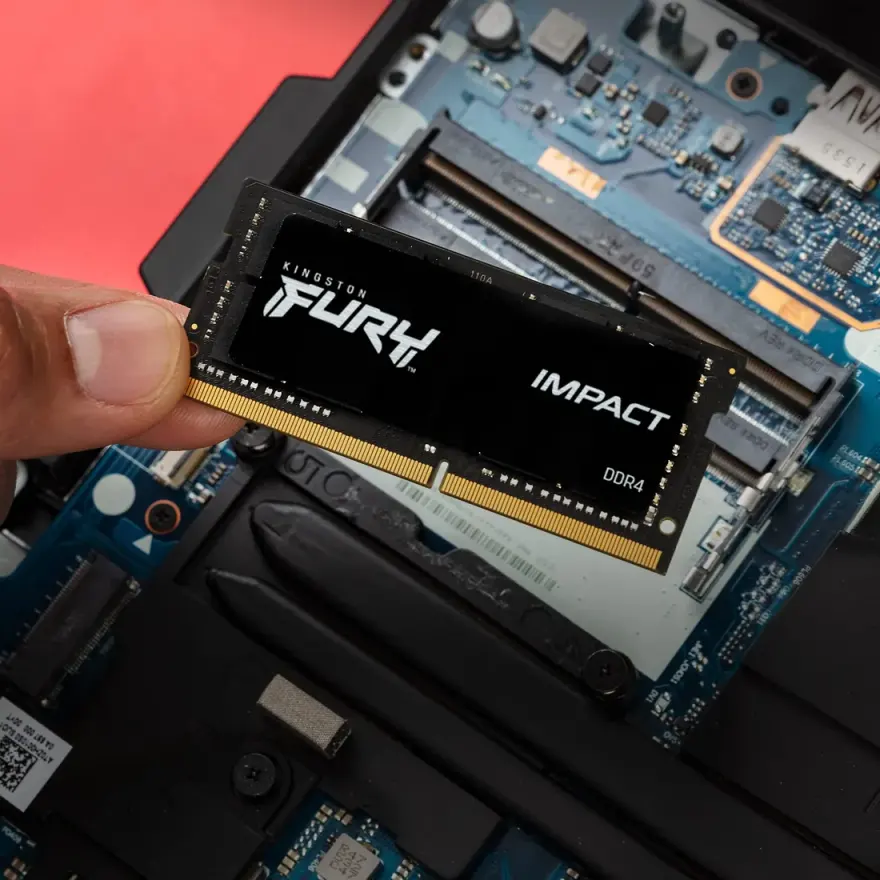
Kingston Fury Impact 32GB Kit (2x16GB) DDR5-5600 Laptop RAM
The Kingston Fury Impact 32GB Kit (2x16GB) DDR5-5600 SODIMM is the latest-generation laptop memory for 12th-gen Intel and AMD Ryzen 7000-series machines. It runs at 5600 MT/s with CL40 timings on 1.1 V, delivering significantly more bandwidth than DDR4 — useful for games, 4K video editing, and AI workloads. At N.N Laptops, Hafeez Center Lahore, this kit costs Rs. 98,000 with a 30-day replacement warranty, backed by Kingston's lifetime support. We bench-test every module on a compatible motherboard to ensure rated speed and error-free operation before dispatch.
Whether you're upgrading a Dell Latitude 5430, HP EliteBook 840 G9, or a Lenovo ThinkPad T14 Gen 3, this 32GB kit ensures smooth multitasking and handles memory-intensive applications without breaking a sweat. In real-world use, you'll see a noticeable improvement in load times for AAA games, faster exports in Adobe Premiere Pro, and the ability to run multiple virtual machines simultaneously. Compared to DDR4, DDR5 offers roughly double the bandwidth, which directly benefits integrated graphics performance and reduces stuttering in demanding titles.
Module specifications
| Brand | Kingston Fury Impact |
|---|---|
| Capacity | 32GB Kit (2x16GB) |
| Speed | DDR5-5600 (5600 MT/s) |
| CAS latency | CL40 |
| Voltage | 1.1 V (on-DIMM PMIC) |
| Form factor | 262-pin SODIMM |
| ECC | On-die ECC (per JEDEC spec) |
| Condition | New, sealed retail |
| Warranty | Kingston lifetime + 30-day replacement from N.N Laptops |
Compatible laptops
DDR5 SODIMM is exclusive to 12th-gen Intel (Alder Lake), 13th-gen (Raptor Lake), 14th-gen Core Ultra (Meteor Lake) and AMD Ryzen 7040/8040 series. It is NOT compatible with DDR4 slots — the notch position is different and pin count is 262 vs 260. Tested machines include Dell Latitude 5430, HP EliteBook 840 G9, Lenovo ThinkPad T14 Gen 3 and Asus ZenBook 14 OLED 2023. See pair this with an SSD upgrade for older DDR4 alternatives. For a list of fully tested DDR5 laptops, reach out on WhatsApp 0314 4000131 — Sayam will confirm compatibility for your exact model.
DDR5 vs DDR4 — what changes in practice
- Bandwidth: roughly 2x DDR4-3200. Helps integrated graphics, video encoding, AI.
- Latency: CL40-46 vs CL22 — absolute latency is similar in nanoseconds despite the higher CL.
- Capacity: single-die DDR5 reaches 32 GB and 48 GB modules, useful for 64-96 GB configs.
- Real-world apps: gaming gain 5-12%, content creation 10-30% in CPU-heavy workloads.
- Power: 1.1 V vs 1.2 V — slightly better laptop battery efficiency under heavy load.
For those in Lahore, Karachi, Islamabad, Rawalpindi, Faisalabad, or Multan, we offer same-day delivery in Lahore and nationwide shipping via TCS or Leopards. Every kit is quality-checked before dispatch; we test each module on a compatible motherboard to ensure it runs at the rated speed with no errors. If you're upgrading from 16GB, the jump to 32GB is immense for content creation and heavy productivity. For typical office work and browsing, 16GB remains sufficient, but this kit future-proofs your system.
Should you upgrade from 16 GB DDR5 to 32 GB?
If you regularly edit 4K video, run virtual machines, or work with Adobe Premiere/After Effects, 32 GB pays for itself within a month in reduced render times and the absence of swap-file thrashing. For typical Office, browsing, programming and university workloads, 16 GB DDR5 is plenty.
Installation guide
Same procedure as DDR4: open the bottom cover, locate the SODIMM slots, release clips, insert the module at 30° and press flat. Some 12th-gen ultrabooks (for example the XPS 13 Plus or MacBook Pro M-series) use soldered LPDDR5 memory and don't accept SODIMMs at all — check your laptop's service manual first. WhatsApp 0314 4000131 with your exact model if unsure. We offer Rs. 98,000 install at the shop, free with any purchase above Rs. 20,000. After booting, verify the new RAM in Task Manager > Performance > Memory (it should report the full installed capacity and the actual operating frequency). For SSD pairing see laptop RAM upgrades.
Who should buy this RAM?
This kit is ideal for professionals editing 4K/8K video, developers running multiple VMs, gamers who want smoother frame times, and anyone building a high-performance laptop for creative work. It's also a great match for the Dell Latitude 5430 and HP EliteBook 840 G9, both of which we've tested in-house. At Rs. 98,000 it's one of the best value DDR5-5600 kits on the market in Pakistan, especially given the 30-day replacement guarantee from N.N Laptops at Shop 66A, 3rd Floor, Hafeez Center, Gulberg III, Lahore.
Frequently asked questions
Does my laptop support DDR5? Only if it has a 12th-gen Intel processor or newer, or AMD Ryzen 7040/8040 series. Earlier laptops use DDR4 and are not DDR5-compatible.
DDR5-4800 vs DDR5-5600 — which is right for my laptop? 12th-gen Intel laptops max out at DDR5-4800 officially; 13th and 14th-gen can run 5200-5600. Buying a 5600 stick is safe either way — it down-clocks on slower platforms.
Can I mix DDR5 brands? Technically yes, but for dual-channel reliability we recommend matched kits from the same brand and speed. Ask us about pre-tested kits.
Is the on-die ECC enough for production work? On-die ECC corrects single-bit errors within the chip but is not full system ECC. For mission-critical workstation use, look for Xeon/EPYC SODIMMs with full ECC — different product line.
Will Windows recognise the new module immediately? Yes. Windows 11 detects DDR5 capacity and speed on first boot. Verify via Task Manager > Performance.