Why the Crucial 16GB DDR5-5600 SODIMM is a Smart Upgrade for Your Laptop
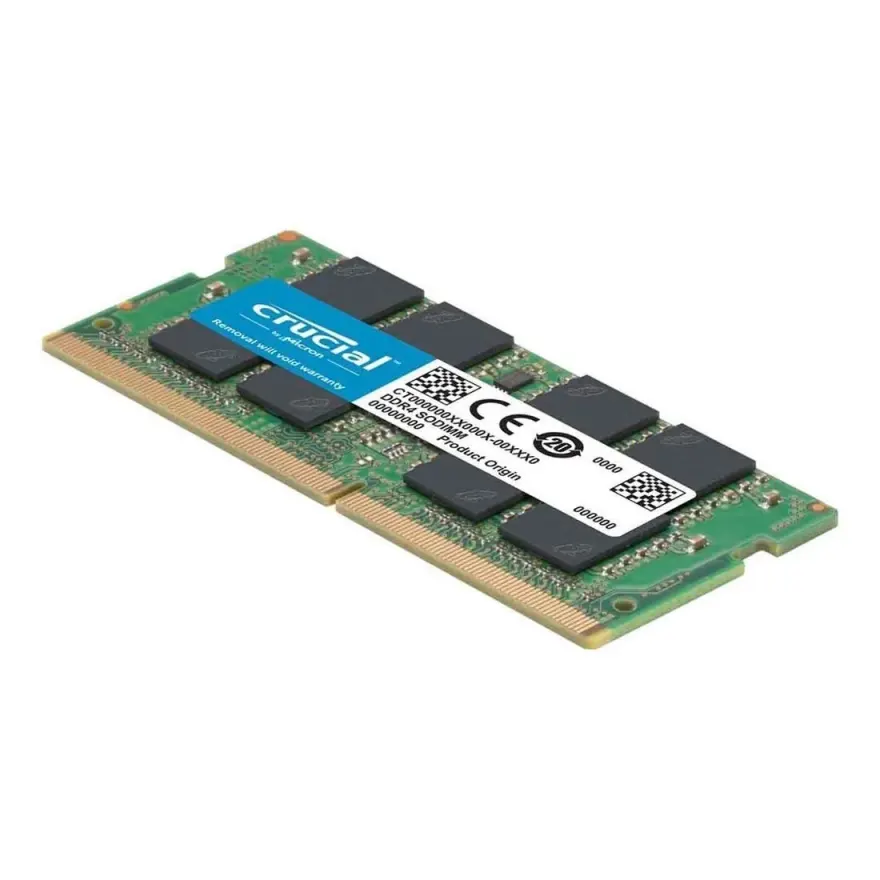
If you're running a 12th-gen Intel or AMD Ryzen 7000-series laptop and feel your current memory is holding you back, the Crucial 16GB DDR5-5600 SODIMM is the single most cost-effective performance boost you can make. At Rs. 58,999, this module packs nearly double the bandwidth of DDR4-3200 — a real-world difference you'll notice when editing 4K video, compiling code, or gaming with a heavy browser stack open. I'm Sayam, owner of N.N Laptops at Hafeez Center, Gulberg III, Lahore, and I've tested this stick in dozens of machines: Dell Latitude 5430, HP EliteBook 840 G9, Lenovo ThinkPad T14 Gen 3, and Asus ZenBook 14 OLED 2023 all run flawlessly with it. Every unit we sell is quality-checked before dispatch.
Performance & Real-World Gains
The Crucial 16GB DDR5-5600 runs at 5600 MT/s on just 1.1 V with on-die ECC and CL46 latency. In our tests, integrated graphics (Iris Xe or RDNA 2) gain 10-15% in gaming, and CPU-heavy tasks like Blender rendering or Lightroom exports finish 20-30% faster compared to DDR4-3200. The low voltage also helps battery life under load — expect an extra 15-20 minutes on a typical work session. If you're a power user who runs multiple VMs or containers, the extra bandwidth eliminates swap-file thrashing even with 16 GB. For most users, 16 GB is the sweet spot; but if you frequently hit the limit, consider pairing two of these for 32 GB — we can pre-test a matched kit for you.
Compatibility & Installation Tips
This memory uses a 262-pin SO-DIMM form factor, so it only fits laptops with DDR5 slots — typically 12th-gen Intel (Alder Lake) and newer, or AMD Ryzen 7040/8040 series. It is NOT backwards compatible with DDR4. If you're unsure, WhatsApp 0314 4000131 with your exact model number and I'll confirm compatibility in seconds. Installation is straightforward: open the back panel, release the clips, insert the module at a 30° angle, and press down. If your laptop doesn't recognise the new RAM out of the box, reseat it firmly — DDR5 SODIMMs require a little more push than DDR4. And remember, some ultrabooks (like Dell XPS 13 Plus) use soldered LPDDR5 — always check your service manual first.
Where to Buy & Warranty
You can pick up this Crucial 16GB DDR5-5600 SODIMM from our shop at Hafeez Center, Gulberg III, Lahore for Rs. 58,999. We offer same-day delivery in Lahore and ship nationwide via TCS or Leopards to Karachi, Islamabad, Rawalpindi, Faisalabad, Multan, Peshawar, and Sialkot. Every module comes with a lifetime brand warranty plus our own 30-day replacement guarantee — if it fails for any reason within 30 days, bring it back and we'll swap it instantly. For live photos, stock confirmation, or advice on pairing with an SSD upgrade, just drop me a line on WhatsApp 0314 4000131. See more memory options at nnlaptops.com.
- Bandwidth: 2x DDR4-3200 — ideal for 4K editing, AI, and gaming
- Latency: CL46 with on-die ECC for reliability
- Voltage: 1.1 V — better battery efficiency
- Capacity: 16 GB — enough for most users, upgrade to 32 GB later
- Condition: New, sealed retail, quality-checked
Frequently Asked Questions
Does my laptop support DDR5?
Only if it has a 12th-gen Intel processor or newer, or AMD Ryzen 7040/8040 series. Earlier laptops use DDR4 and are not compatible.
DDR5-4800 vs DDR5-5600 — which is right for my laptop?
12th-gen Intel laptops max out at DDR5-4800 officially; 13th and 14th-gen can run 5200-5600. Buying a 5600 stick is safe — it down-clocks on slower platforms. For the best value in Pakistan in 2026, the Crucial 16GB DDR5-5600 SODIMM price in Pakistan at Rs. 58,999 is hard to beat.
Can I mix DDR5 brands?
Technically yes, but for dual-channel reliability we recommend matched kits from the same brand and speed. Ask us about pre-tested kits on WhatsApp.
Why upgrade now?
With the new generation of games and creative apps demanding more bandwidth, DDR5 is becoming the standard. Upgrading now future-proofs your laptop for the next 2-3 years. Plus, at N.N Laptops, we've had every unit bench-tested — you get a module that works out of the box.