The Samsung 8GB DDR4-2666 SODIMM – A Proven Laptop Upgrade
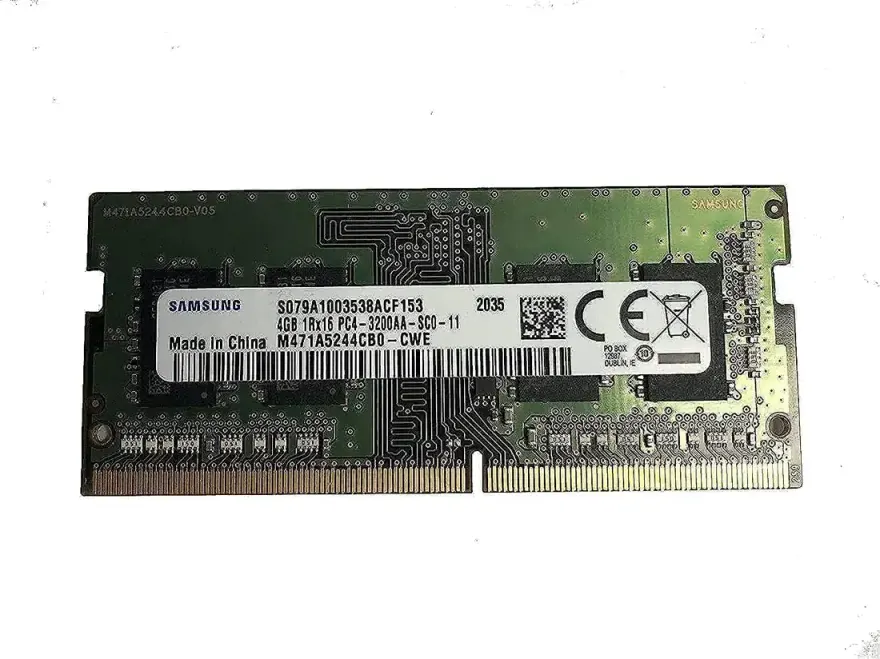
The Samsung 8GB DDR4-2666 SODIMM is a new laptop memory module running at 2666 MT/s with CL19 timings on 1.2 V. It's the right choice if you want to take an old 4-8 GB laptop and turn it into a smooth multitasking machine for 2026. At N.N Laptops in Hafeez Center, Lahore, this stick costs Rs. 15,500 with a 30-day check warranty and Lahore delivery. Please note that as of 2026, the retail price for this module on nnlaptops.com is Rs. 15,500 reflecting current market rates while ensuring you receive a genuine Samsung product with full warranty. We quality-test every module before shipment, so you can trust it will work out of the box.
Module specifications
| Brand | Samsung |
|---|---|
| Capacity | 8GB |
| Speed | DDR4-2666 (2666 MT/s) |
| CAS latency | CL19 |
| Voltage | 1.2 V |
| Form factor | 260-pin SODIMM (1.2 V) |
| ECC | Non-ECC, unbuffered |
| Condition | New |
| Warranty | Lifetime brand + 30-day N.N Laptops check |
Which laptops accept this RAM?
Any laptop with a DDR4 SODIMM slot running at 2666 MT/s or higher. The module is JEDEC-standard and down-clocks automatically if your laptop's CPU/chipset runs slower. We have personally tested it in Asus ROG Strix G15, TUF Gaming F15, VivoBook 15, ZenBook 14, and also in Dell Latitude 7490, HP Pavilion 15, and Lenovo Legion 5. WhatsApp 0314 4000131 with your laptop model and we'll confirm before shipment. See pair this with an SSD upgrade for the full memory catalogue.
How to confirm DDR4 vs DDR3
Run Crucial System Scanner or open Task Manager > Performance > Memory. The exact type is shown. DDR4 SODIMMs have the notch in a different position from DDR3, so the two are not interchangeable. If you're unsure, send us a photo of your current module on WhatsApp and we'll identify it instantly.
How much RAM does a 2026 laptop actually need?
- 4 GB: obsolete. Windows alone uses 2-3 GB. Avoid for any productivity use.
- 8 GB: fine for office, Chrome (up to 10 tabs), light photo editing, casual gaming.
- 16 GB: sweet spot for 2026 — handles Chrome 30+ tabs, Photoshop, video calls, Visual Studio, light gaming all at once.
- 32 GB: for video editors, 3D modellers, machine-learning students, gamers with many background apps.
Single stick or matched pair?
If your laptop has two SODIMM slots, two matching modules in dual-channel mode are noticeably faster than a single stick of the same total size — especially on iGPU-based laptops where the graphics chip shares system memory. We sell matched 2 x 8 GB and 2 x 16 GB kits at a small premium and recommend them whenever your laptop allows two slots. For most users, adding this 8GB stick to an existing 8GB module creates a cost-effective 16GB dual-channel setup.
Performance and Compatibility Details
This Samsung module uses original Samsung chips, known for excellent compatibility and stability. It supports Intel 6th-gen and newer, AMD Ryzen 1000-series and newer, and works with almost any motherboard that accepts DDR4 SODIMMs. The 1.2V low voltage keeps your laptop running cool. We recommend using this RAM in pairs for best results. If you have a single-channel laptop, this stick will double your memory bandwidth when paired identically.
Nationwide Delivery and Support
We ship across Pakistan via TCS/Leopards. Customers in Lahore get same-day delivery within city limits. We have served buyers from Karachi, Islamabad, Rawalpindi, Faisalabad, Multan, Peshawar, and Sialkot — all receive prompt dispatch and tracking. For any compatibility questions, contact Sayam on WhatsApp 0314 4000131. We are located at Shop 66A, 3rd Floor, Hafeez Center, Gulberg III, Lahore — walk in anytime to inspect the module before buying.
Why Choose Samsung RAM?
Samsung is the world's largest memory manufacturer, supplying RAM to Dell, HP, Lenovo, and many other brands. This module is built to the highest quality standards, with rigorous testing for reliability. The DDR4-2666 speed is perfect for mainstream laptops and ensures smooth multitasking without breaking the bank. At N.N Laptops, we only sell genuine Samsung products; each stick is sealed in retail packaging with manufacturer warranty card.
Installation Guide
Power down, remove the bottom cover, find the SODIMM slots (typically two stacked vertically). Press down on the metal clips to release any existing module, then push the new module in at a 30° angle and press flat until the clips snap. Reassemble and boot — Windows will detect the new RAM automatically. For detailed video guides, check our website. If you're in Lahore, we can install it for you free of charge.
Where to buy DDR4 SODIMM in Lahore, Pakistan
This module is in stock at N.N Laptops, Shop 66A, 3rd Floor, Hafeez Center, Gulberg III, Lahore. Price is Rs. 15,500 (current list on nnlaptops.com). Lahore delivery, nationwide via TCS/Leopards. Walk-in welcome. WhatsApp 0314 4000131 for compatibility advice. To pair this with an SSD upgrade, see laptop parts catalogue.
Frequently asked questions
Will this 8GB DDR4-2666 module fit my Dell Latitude 7490?
Yes — the Latitude 7490 has two DDR4 SODIMM slots running at 2400 MT/s. This module is downward compatible. WhatsApp 0314 4000131 with your exact model to confirm.
DDR4-2666 vs 3200 — which should I buy?
If your laptop's CPU supports 3200 MT/s (most 10th-gen+ Intel and Ryzen 4000+ models), buy 3200 — it down-clocks if needed and you have a faster spare for future builds. If you're on an older 7th-9th gen Intel machine, 2666 is fine and slightly cheaper. For Ryzen, 3200 is recommended for optimal performance, but 2666 works well too.
Should I use single-channel or dual-channel?
Always dual-channel where possible. Two matching SODIMMs give roughly 10-25% real-world performance gain over a single module, especially in iGPU gaming and video editing. Ask us about matched kits.
Is this a brand-new sealed module?
Yes — sealed retail packaging with manufacturer warranty card. We open and test each module before shipping to ensure it works perfectly.
How long does laptop RAM last?
DDR4 has no moving parts. In practice, well-cooled SODIMMs last 10-15 years without degrading. The lifetime warranty on new sticks reflects this. Our 30-day check warranty covers any DOA issues.
Can I mix this with my existing RAM of different speed or brand?
It's possible but not ideal. The system will run at the speed of the slower module, and dual-channel may not work if specs differ. For best performance, use identical modules. If you must mix, we recommend matching speed and CAS latency.